
Understanding Default Phone Preferences for New Sub-Accounts
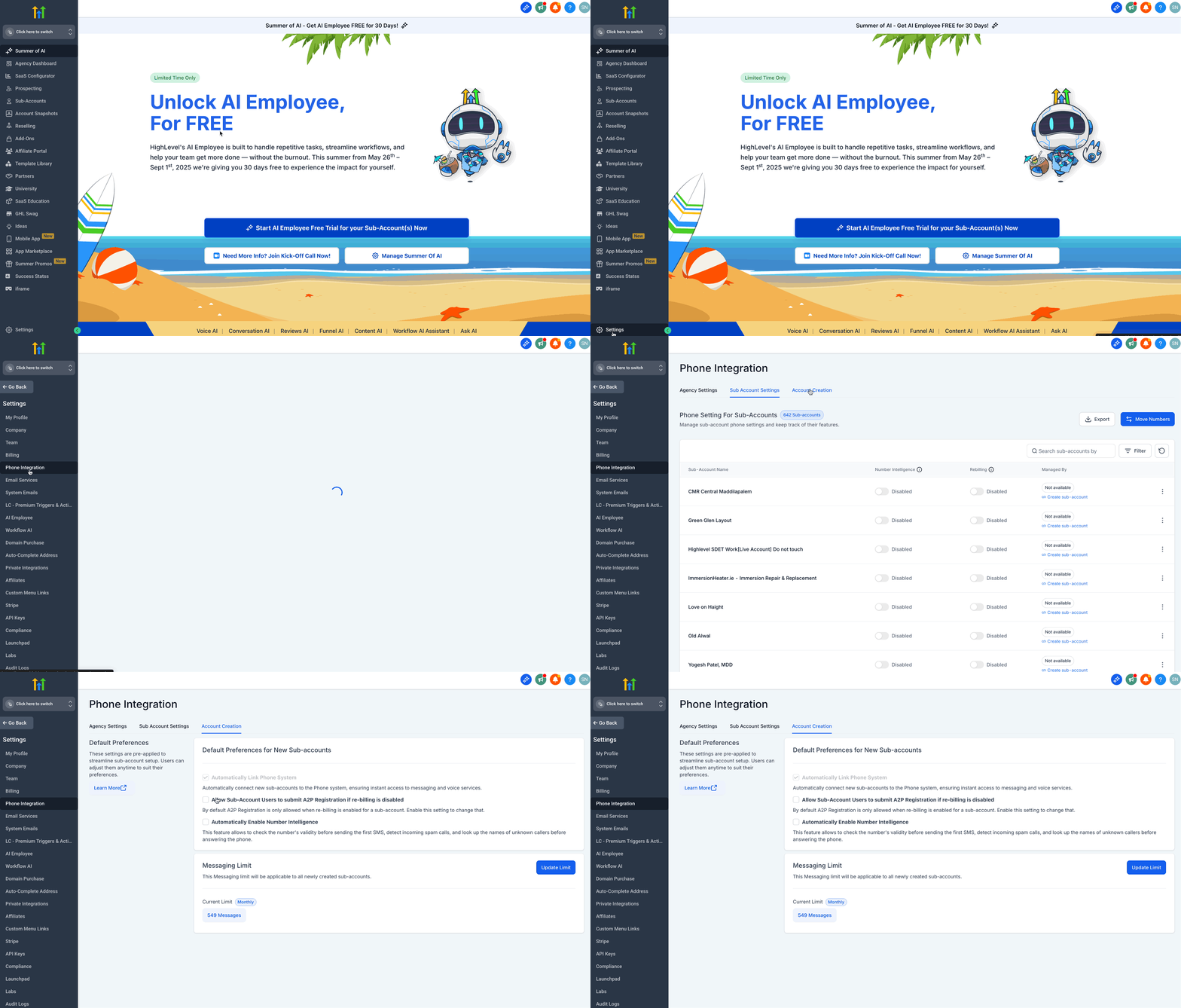
When creating new sub-accounts, certain settings are pre-applied to streamline the setup process. These settings ensure that sub-accounts are configured optimally from the start, reducing manual adjustments. However, users can modify them at any time to better suit their operations. * * * ## How to Modifying These Settings Users can adjust these preferences anytime based on their operational requirements. To make changes: 1. Login to your Agency Account and click on Settings. 2. Click on Phone Integration. 3. Click on the Account Creation tab. 4. Update the settings based on your needs.!(https://assets.patientcopilot.ai/92bdadc47291e399.gif) * * * ## Understanding Default Preferences ### 1. Automatically Link Phone System ✅ Pre-enabled by default This setting ensures that new sub-accounts are automatically connected to the phone system. It provides instant access to messaging and voice services, eliminating the need for manual setup. ### 2. Allow Sub-Account Users to Submit A2P Registration if Re-Billing is Disabled By default, sub-accounts can only submit A2P (Application-to-Person) registration if re-billing is enabled. Enabling this option allows users to submit A2P registration even when re-billing is disabled. (Optional setting) ### 3. Automatically Enable Number Intelligence This feature provides enhanced phone number intelligence by: - Validating numbers before sending the first SMS
- Detecting incoming spam calls
- Looking up the names of unknown callers before answering Enabling this setting improves the efficiency and reliability of phone communication. (Optional setting) ### 4. Messaging Limit The Messaging Limit applies to all newly created sub-accounts. The selected limit determines the messaging capacity for new sub-accounts, ensuring compliance with usage policies. - Current Limit: Messaging Ramp (default setting) - Users can modify this setting as needed. * * * ## Related Articles - (https://help.patientcopilot.ai/en/support/solutions/articles/48001240107)[What is LC - Phone System?](https://help.patientcopilot.ai/en/support/solutions/articles/48001223546)
- Moving US numbers from Twilio to LeadConnector(LC)
- Migrating International Numbers(Twilio to LC Phone)
- Moving Phone Numbers from LC Phone to Twilio (US & International)
- How to Disable LC Phone System for Subaccount/Location (LC to Twilio) Was this article helpful? That’s Great! Thank you for your feedback Sorry! We couldn’t be helpful Thank you for your feedback Feedback sent We appreciate your effort and will try to fix the article