
Nested Layouts in Funnel and Website Builder
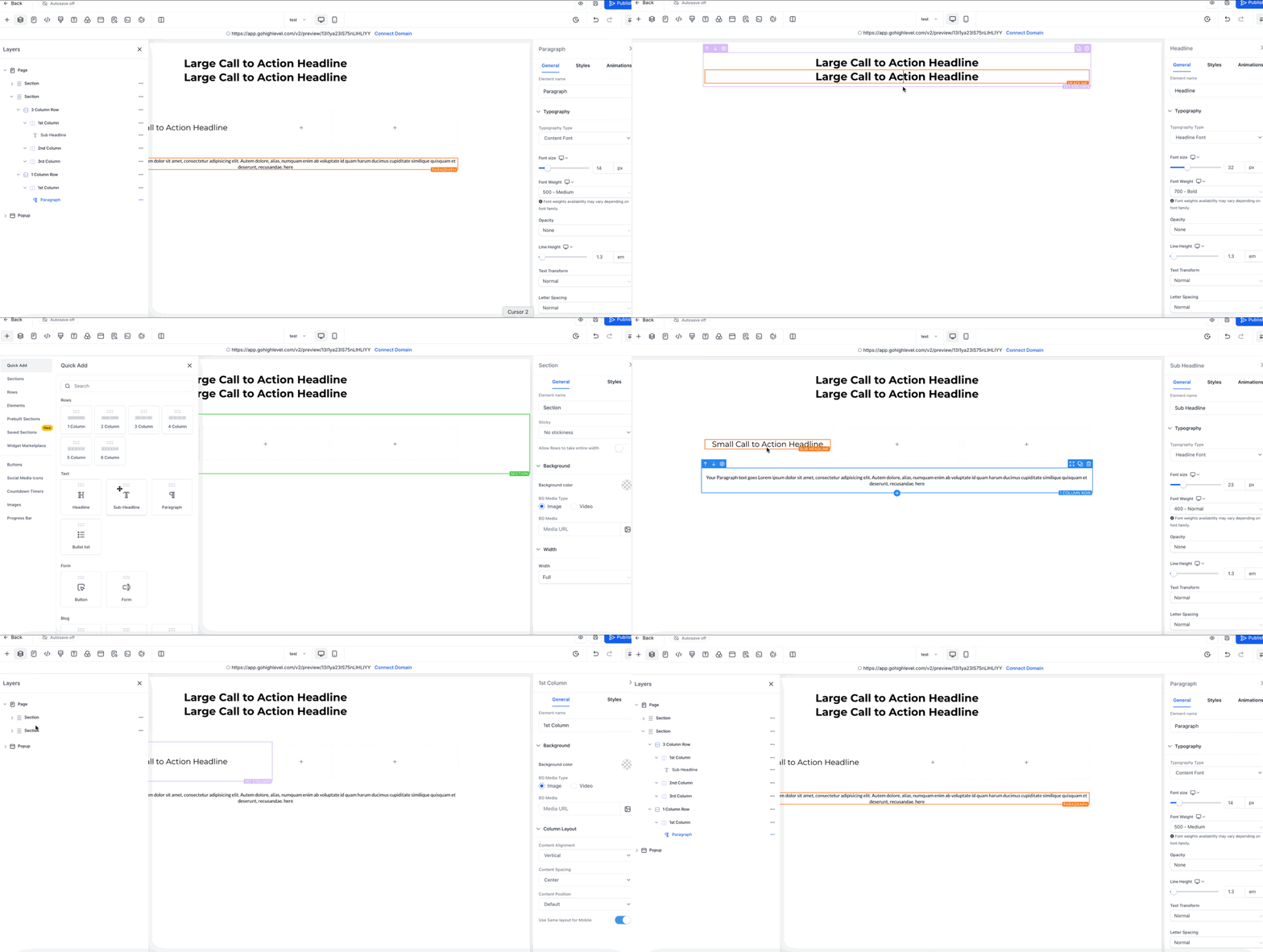
Discover how Patient Copilot’s Nested Layouts empower you to build advanced, responsive page designs with ease. This innovative feature streamlines the creation of multi-column and adaptive layouts directly in the Funnel and Website Builder, saving you time while enhancing design precision. * * * ## What are Nested Layouts? Nested Layouts allow you to place layout containers within other layout containers, giving you precise control over how elements are structured on a page. This structure enables you to easily manage multi-column designs, adaptive spacing, and responsive sections with enhanced visual control. Whether you’re creating opt-in pages, comparison tables, or product showcases, Nested Layouts simplify the process while enhancing visual consistency and alignment. * * * ## Key Benefits of Nested Layouts Nested Layouts eliminate complexity and add power to your page design toolkit: - Flexible Structure: Easily place rows, columns, and other layouts within one another. - Real-Time Settings: Instantly change layout direction (row, column, collage) with live previews. - Precise Spacing Tools: Set margins, padding, and alignment exactly how you want—at every level. - No More Workarounds: Design complex pages without custom CSS or third-party solutions. - Reusable Layouts: Save time by duplicating and modifying nested containers for consistent branding. * * * ## How To Set Up Nested Layouts in the Builder Nested Layouts are easy to implement using the Funnel or Website Builder’s drag-and-drop interface. Here’s how to get started: 1. Log in to your subaccount and open your desired Funnel or Website. 2. Drag a Layout Container onto the canvas. 3. Drag a second Layout Container into the first to form the nested structure. 4. Open Layout Settings and choose row, column, or collage orientation. 5. Adjust Spacing & Alignment for margins, padding, and positioning. Repeat steps 3–5 for additional nested levels as needed. 6. Click Save to commit your layout or add it to Saved Sections for reuse.!(https://assets.patientcopilot.ai/5b01aa798c3c24e7.gif) * * * ## Examples of What You Can Build Now - Two-column opt-in pages: Put your headline and form on one side, testimonials and social proof on the other.
- Pricing comparison tables: Create multi-column layouts with different sized sections for features, pricing, and call-to-action buttons.
- Feature showcase grids: Build complex layouts with images, text, and buttons that align perfectly across rows and columns. * * * ## Frequently Asked Questions Q: How do I add a nested container? Drag a Layout Container into an existing Layout Container—the blue highlight shows a valid drop zone. Q: Can I nest Sections or Rows? No. Only Layout Containers can be nested. Sections and Rows remain single‑level for performance reasons. Q: Is there a depth limit? Practically no, but we recommend three to four levels for maintainability and load speed. Q: Do Nested Layouts work in Saved Sections and Funnels? Yes. Saved Sections keep their nested structure and sync globally when updated. * * * ## Related Articles - Sites Overview - Nested URL Paths Support for Websites, Funnels, Ecomm & Webinars - A Quick Walkthrough of SEO: A Guide to Boosting Your Search Rankings - Funnels & Websites | Creating Categories in the Navigation Menu - Audit Logs in Funnels, Websites, Webinars & Stores - FAQs, Basic Troubleshooting - Funnels, Websites, Webinars Was this article helpful? That’s Great! Thank you for your feedback Sorry! We couldn’t be helpful Thank you for your feedback Feedback sent We appreciate your effort and will try to fix the article