
Workflows vs Campaigns/Triggers (Deprecated features)
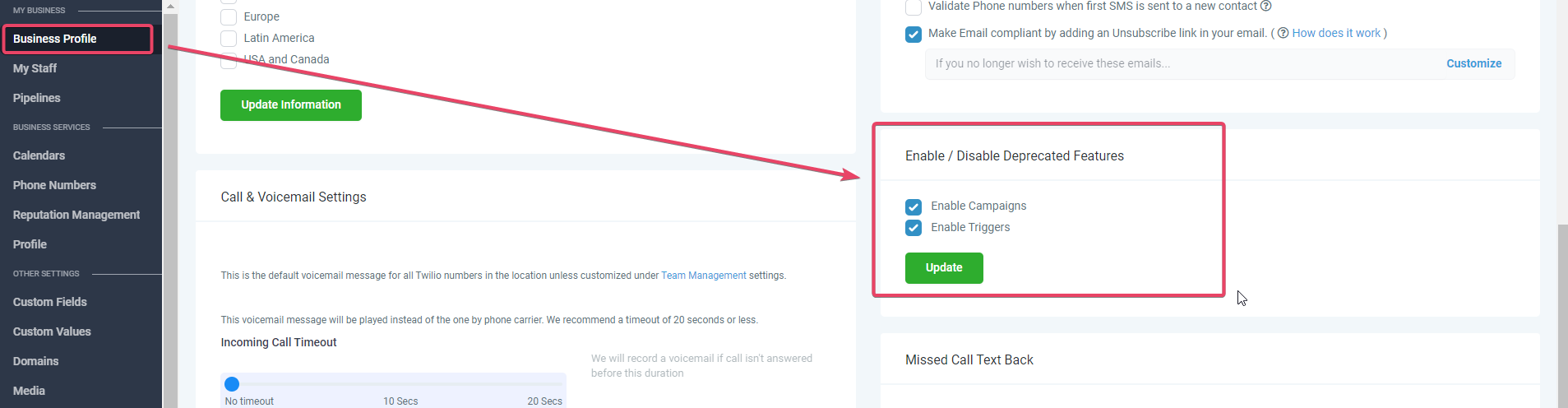
Campaigns and Triggers are deprecated. Workflows make it easy to create automation with triggers and actions with more capabilities. Workflows have capabilities like using if-else statements, wait times, math functions and so much more. Overall, workflows offer a more powerful and comprehensive automation solution. This article is provided for context. ## Why Replace Campaigns and Triggers with Workflows? - Workflows can use if/else conditions and filtering, which allows for more personalized and targeted automation. - They combine triggers and campaigns into one system, making it more efficient and streamlined. - Workflows have a status/execution log that makes it easier to troubleshoot and track lead status. - Workflows are easier to test during onboarding and launch for quality assurance, ensuring that the product is working correctly for clients. You can import your campaigns into workflows, and then add the triggers as well for a more streamlined automation process. * * * ## Why are Campaigns and Triggers not visible in my Sub-account? To see Campaigns & Triggers the subaccount has to be created from a snapshot of an older subaccount that still has them. If the sub-account was created using a snapshot of a master account that did not already have campaigns and triggers in it then it will not allow you to see the depreciated features setting in sub-account> Settings> Business Profile. But if it was created using the snapshot of a master sub-account that already had triggers and campaigns in it, it should give you the option to enable depreciated features in Business Profile settings. !(https://assets.patientcopilot.ai/baf382483492b38d.png) The CRM is moving clients towards workflows and moving them away from campaigns and triggers, so these two features are automatically disabled and have no option to be enabled in sub-accounts that were created using snapshots of sub-accounts that did not have these features, to begin with. Agencies created after November 2021 do not see the option to enable Deprecated Features Campaigns & Triggers. * * * ## Workflows vs Triggers ### Trigger steps comparison Table The following is a table of which Trigger steps are supported by Workflows in comparison to Triggers. Please Note: Campaigns cannot be triggered without a Trigger adding contacts to them. Or Contacts being added to them via Bulk Add to Campaign Actions or CSV Import Add to Campaign Modal. | Trigger Step | Workflows | Triggers | | --- | --- | --- | | | Appointments | | Appointment Status | Yes | Yes | | Customer Booked Appointment | Yes | Yes |
| Contact | ||
Birthday Reminder | Yes | Yes |
Contact Changed | Yes | No |
Contact Created | Yes | No |
Contact DND | Yes | Yes |
Contact Tag | Yes | Yes |
Custom Date Reminder | Yes | Yes |
Note Added | Yes | Yes |
Note Changed | Yes | No |
Task Added | Yes | Yes |
| Contact Actions | ||
Customer Replied | Yes | Yes |
Form Submitted | Yes | Yes |
Order Form Submission | Yes | Yes |
Order Submitted | Yes | No |
Survey Submitted | Yes | Yes |
Trigger Link Clicked | Yes | Yes |
Twilio Validation Error | Yes | Yes |
| Events | ||
Call Status | Yes | Yes |
| Yes | Yes | |
Facebook Lead Form Submitted | Yes | Yes |
| Membership | ||
Category Completed | Yes | No |
Membership New Signup | Yes | Yes |
Offer Access Granted | Yes | Yes |
Offer Access Removed | Yes | Yes |
Product Access Granted | Yes | Yes |
Product Access Removed | Yes | Yes |
Product Completed | Yes | Yes |
User Login | Yes | Yes |
| Opportunities | ||
Opportunity Status Changed | Yes | Yes |
Pipeline Stage Changed | Yes | Yes |
Stale Opportunities | Yes | Yes |
| Shopify | ||
Abandoned Checkout | Yes | No |
Order Placed | Yes | No |
Order Fulfilled | Yes | No |
| TikTok | ||
TikTok Form Submitted | Yes | No |
| CRM | |||
Add Contact Tag | Yes | No | Yes |
Remove Contact Tag | Yes | No | Yes |
Create/Update Opportunity | Yes | No | Yes |
Add To Notes | Yes | No | Yes |
Assign To User | Yes | No | Yes |
Remove Assigned User | Yes | No | Yes |
Set Event Start Date | Yes | No | Yes |
Add To Workflow | Yes | No | No |
Remove From Workflow | Yes | No | No |
Remove From All Workflows | Yes | No | No |
| Remove From Campaign | No | No | Yes |
| Remove From All Campaigns | No | No | Yes |
| Add to Campaign | No | No | Yes |
Remove Opportunity | Yes | No | Yes |
Send Internal Notification | Yes | No | Yes |
Set Contact DND | Yes | No | Yes |
Edit Conversation | Yes | No | Yes (Only Mark as Read) |
Send Review Request | Yes | No | No |
Stripe One-Time Charge | Yes | No | Yes |
Update Appointment Status | Yes | No | Yes |
Add Task | Yes | No | Yes |
AI Appointment Booking Bot | Yes | No | No |
Send To Eliza Agent Platform | Yes | No | No |
Add To Google Analytics | Yes | No | Yes |
| Add to Google Adwords | Yes | No | Yes |
| Update Contact Field | Yes | No | Yes |
Facebook - Add To Custom Audience | Yes | No | No |
Facebook - Remove From Custom Audience | Yes | No | No |
Facebook - Conversion API | Yes | No | No |
| Membership Actions | |||
Membership Grant Offer | Yes | No | Yes |
Membership Revoke Offer | Yes | No | Yes |
| Conditions and workflow | |||
If / Else | Yes | No | No |
Wait | Yes | Yes | No |
Webhook | Yes | Yes | Yes |
Go To | Yes | No | No |
Math Operation | Yes | No | No |
Goal Event | Yes | No | No |