
How to Use Wait Time in Recurring Timer
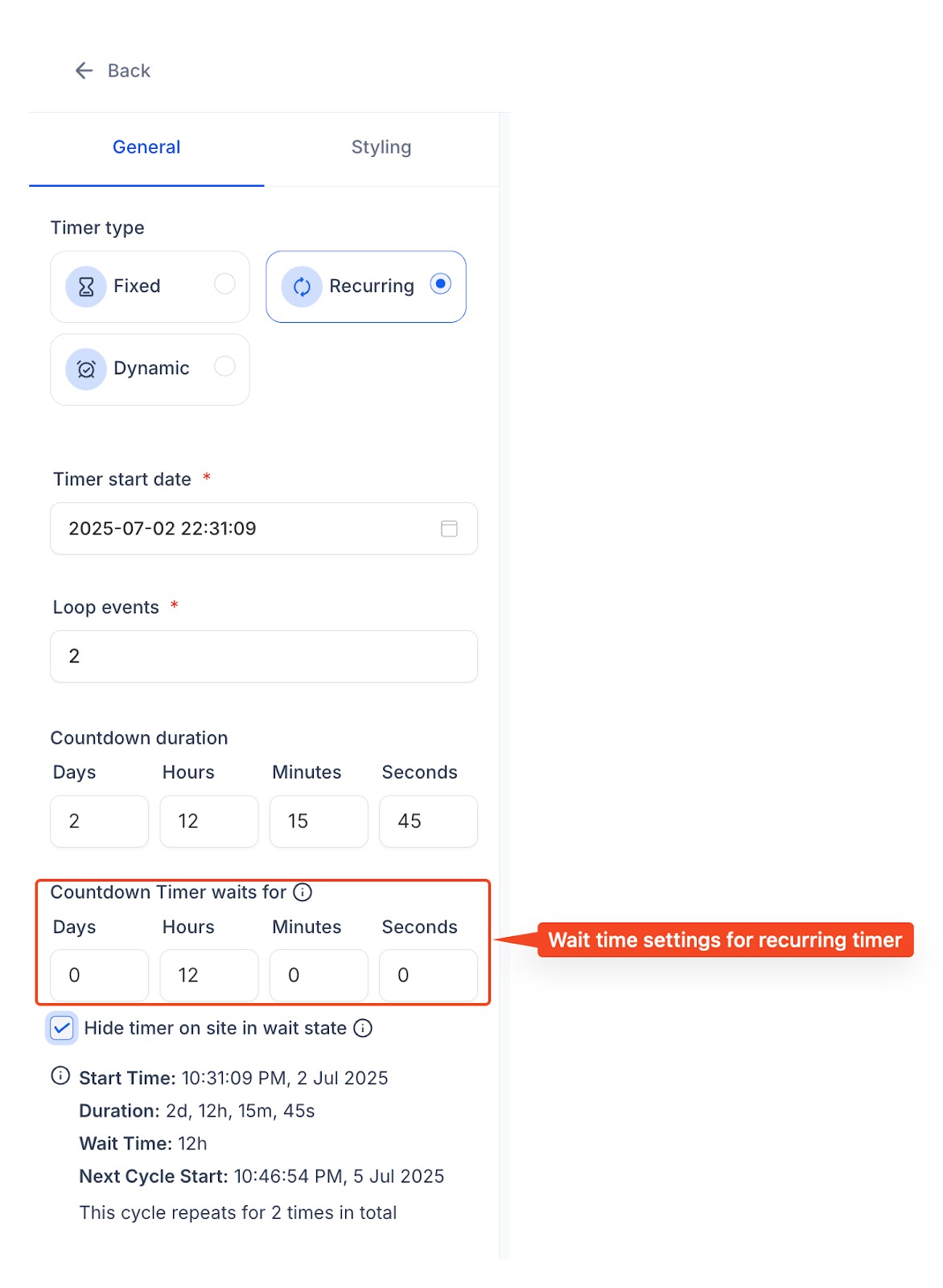
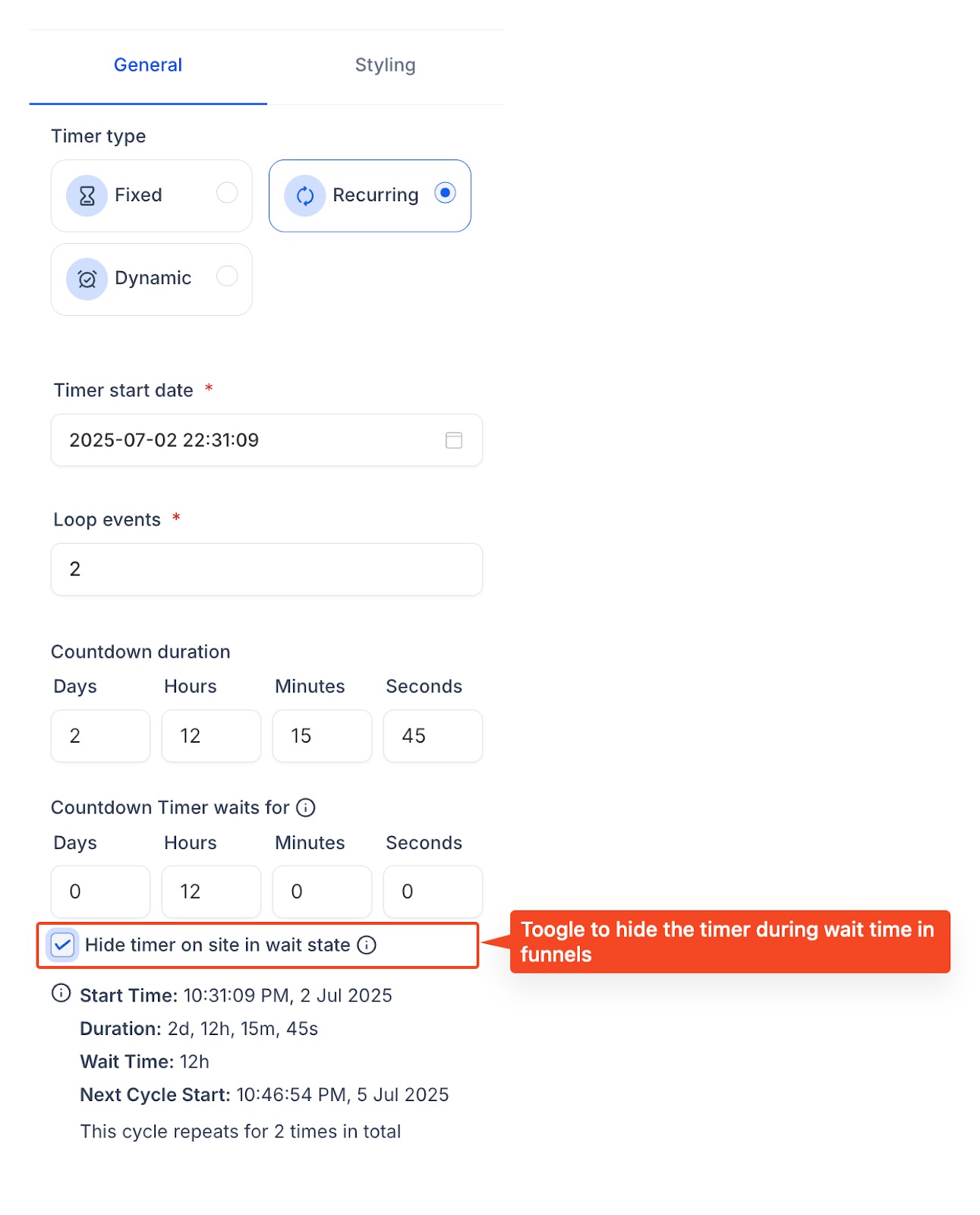
This article shows you how to add a custom wait time between cycles of a recurring countdown timer. Use the feature to run “Every Friday” flash sales, weekly webinar countdowns, or monthly product drops—without rebuilding timers each time they reset. ## What Is Custom Wait Time for Recurring Timers? Custom wait time lets a recurring timer pause for a set duration after it reaches 00: 00: 00, then start the next cycle automatically. During the pause (the Wait state) you can decide whether the timer stays visible at zero or disappears entirely in funnels, while emails show a zero-state banner that links to your expiry page.!(https://assets.patientcopilot.ai/e7200d5fc2676d60.jpg) ## Key Benefits of Custom Wait Time Adding a pause between cycles unlocks new campaign ideas and slashes repetitive setup work. - Automate recurring promos such as “Every Friday Sale” or weekly challenges. - Run evergreen webinars by counting down to the next session each week. - Control visibility—hide timers in funnels during off-hours to keep pages tidy. - Reuse a single asset across emails and funnels instead of cloning timers. - Align email & page logic with consistent zero-state and redirect behaviour. ## How to Configure a Recurring Timer with Wait Time Follow these steps once; the timer will self-manage every cycle. 1. Navigate to Marketing ▸ Countdown Timer ▸ New Timer. 2. Choose Recurring and set your Start and End offsets. 3. Toggle Custom Wait Time and enter a duration (e.g., 5 days 12 hours). 4. (Optional) Enable Hide Timer in Wait State to remove the timer from funnels during the pause. 5. Select the Expiry Page / URL visitors should see when they click the timer or refresh a funnel during Wait. 6. Save and embed the timer block in funnels and/or emails.!(https://assets.patientcopilot.ai/79eb9606f3862cbd.jpg) ## Timer Lifecycle Explained Knowing what contacts see at each stage helps you design seamless journeys. vbnet CopyEdit Active Cycle ─┐ │ hits 00:00 ▼ Wait State (custom duration) │ auto-restart ▼ Next Active Cycle → … (repeats)
State | Email Behaviour | Funnel Behaviour |
Active | Live ticking countdown | Live ticking countdown |
Wait | Timer shows 00: 00: 00; clicking it redirects to Expiry Page | • Timer hidden or shows 00: 00: 00 (based on your toggle) • If the page is refreshed while Wait is active, user is redirected to Expiry Page |
Reset | New cycle begins automatically | New cycle begins automatically |
Scenario | Start → End | Wait Time | Result |
Every Friday Sale | Fri 00:00 → Fri 23:59 | 6 days 1 min | Timer re-arms for the next Friday at midnight |
Weekly Webinar | Mon 09:00 → Thu 17:00 | 3 days 16 hrs | Countdown resumes each Monday morning |
Monthly Drop | 1st 00:00 → 3rd 23:59 | 27 days | Runs on the first three days of every month |