SSL Certificates for Dedicated LC Email Domains
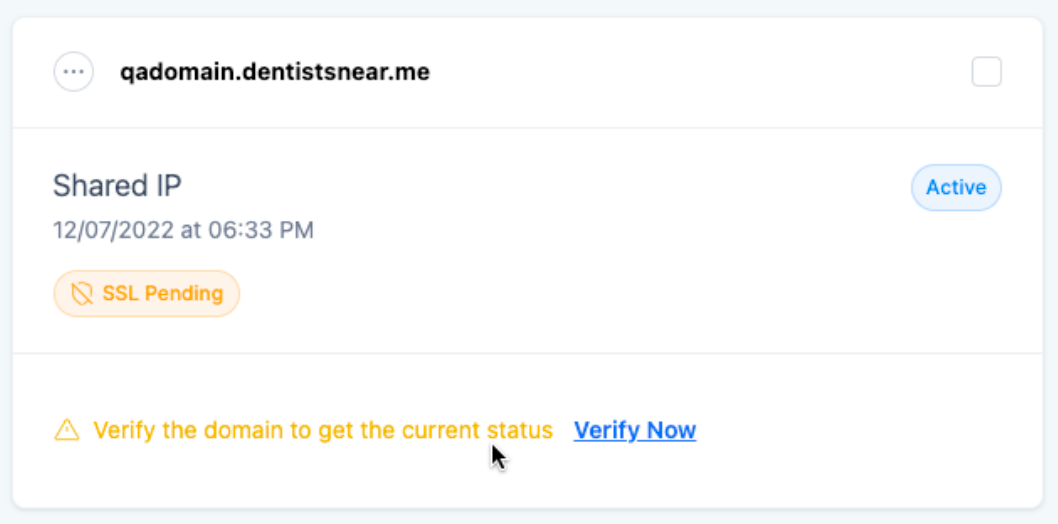
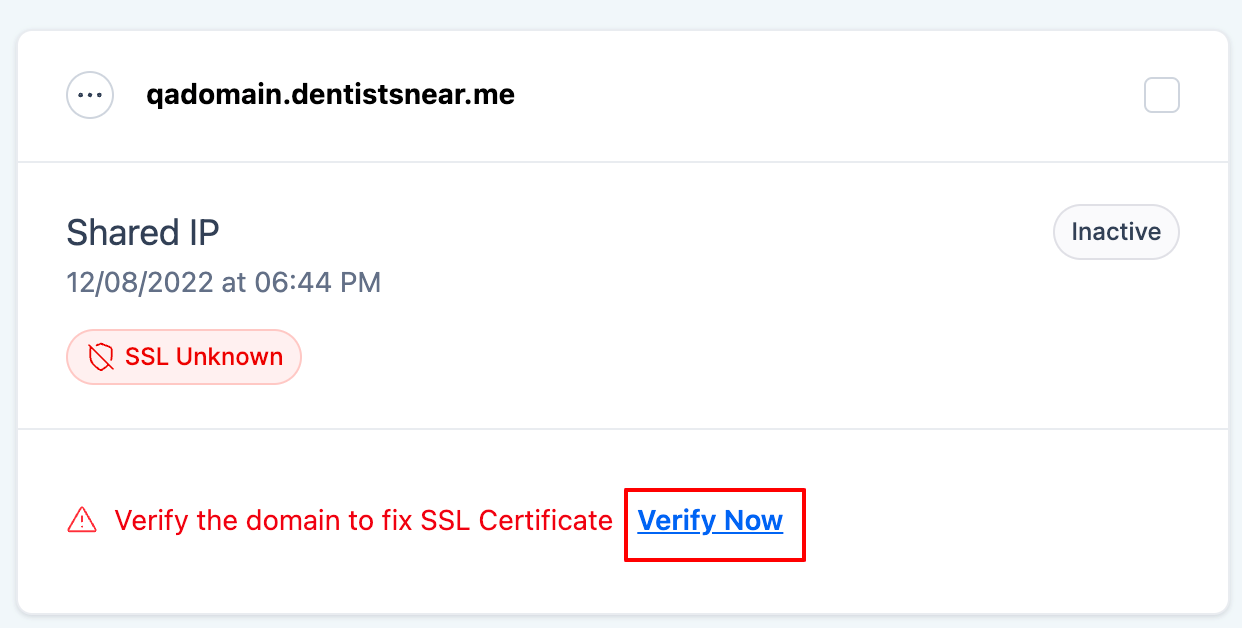
SSL certificates (Secure Sockets Layer) ensure that any links included in the email are secure and accessible by encrypting tracking URLs, open URLs, and click URLs in your emails. Without an SSL certificate, links in your emails will break, resulting in recipients encountering errors when trying to open them. When a dedicated domain is added and verified in the email system, an SSL certificate is issued automatically. There are three possible SSL statuses for your domain: 1. SSL Issued: The SSL certificate has been successfully created. 2. SSL Pending: The SSL certificate is in the process of being generated. 3. SSL Unknown: The SSL certificate has not been generated or issued. * * * ## Why Do I Need an SSL Certificate? Without a valid SSL certificate, recipients may see broken links or security warnings, which could harm your sender reputation and reduce engagement with your emails. Ensuring the SSL is issued and valid is critical to successful email campaigns and maintaining a secure digital presence. - Prevent Broken Links: SSL certificates ensure links in your emails are functional and prevent the dreaded “This site can’t provide a secure connection” error.
- Enhance Security: They secure communication between your domain and the recipient, ensuring encrypted links that inspire trust.
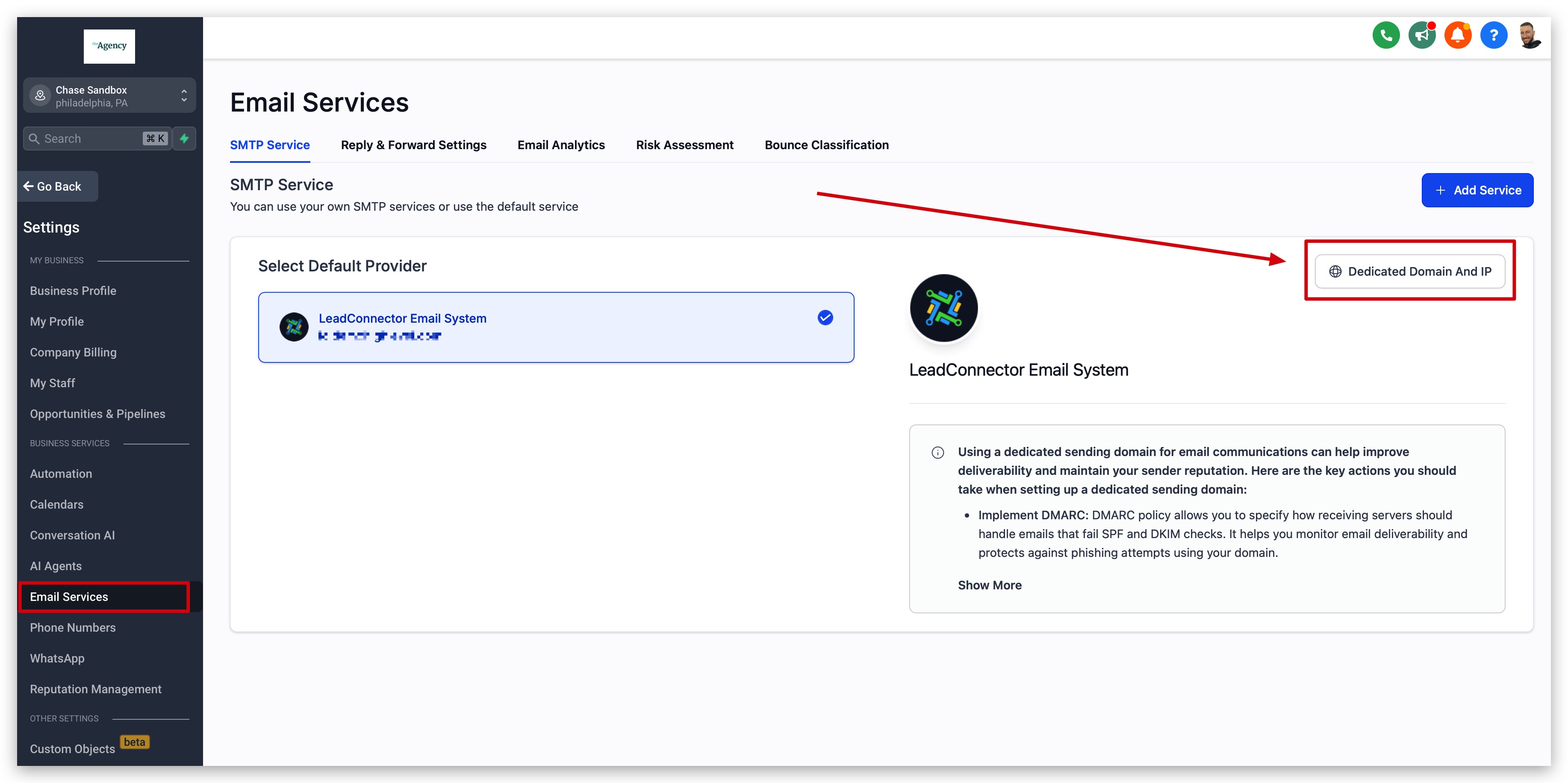
- Maintain Engagement: Preventing errors means higher engagement with your email campaigns, as users can easily access your content without security warnings or disruptions. * * * ## Where to See SSL Certificates To access SSL management for your custom email domain, follow these steps: 1. Navigate to Location Settings.
- Select Email Services.
- On the right side, click the Dedicated Domain And IP button. This will bring up the domain management screen, where you can check the status of your SSL certificate and take action if needed.!(https://assets.patientcopilot.ai/0a7beb4f02c747d7.jpg)!(https://assets.patientcopilot.ai/a6a574c0d4f8cffc.jpg) * * * ## How To Setup SSL Certificates For LC Email Domains Setting up or resolving SSL issues for your custom domain is straightforward. Below are the steps to ensure your SSL certificate is issued or reissued. By following these steps, you ensure that your custom domain and email campaigns are secure, functional, and trustworthy. ### Step 1: Verify the Domain - Navigate to Settings > Email Services > Dedicated Domain And IP.
!(https://assets.patientcopilot.ai/a6a574c0d4f8cffc.jpg)
- Click the Verify Now button next to your domain.
- You will be redirected to your domain DNS page. Ensure all DNS records are correctly set up and verified. DNS Instructions for Common DNS Providers: - GoDaddy(https://support.google.com/a/answer/48090?hl=en)
- Google Domains(https://www.hostgator.com/help/article/manage-dns-records-with-hostgatorenom)(https://www.hostgator.com/help/article/manage-dns-records-with-hostgatorenom)
- Hostgator(https://help.hover.com/hc/en-us/articles/217282457-How-to-Edit-DNS-records-A-CNAME-MX-TXT-and-SRV-Updated-Aug-2015-)
- Hover(https://www.namecheap.com/support/knowledgebase/article.aspx/9214/31/cpanel-email-deliverability-tool—spf-and-dkim-records/)
- Namecheap
- Squarespace(https://docs.aws.amazon.com/Route53/latest/DeveloperGuide/resource-record-sets-editing.html)
- AWS(https://developers.cloudflare.com/dns/manage-dns-records/how-to/create-dns-records/)(https://developers.cloudflare.com/dns/manage-dns-records/how-to/create-dns-records/)
- Cloudflare(https://www.bluehost.com/help/article/dns-management-add-edit-or-delete-dns-entries)(https://www.bluehost.com/help/article/dns-management-add-edit-or-delete-dns-entries)
- Bluehost(https://www.hostinger.com/tutorials/how-to-use-hostinger-dns-zone-editor)(https://www.hostinger.com/tutorials/how-to-use-hostinger-dns-zone-editor)
- Hostinger(https://www.inmotionhosting.com/support/domain-names/create-cname-record/)(https://www.inmotionhosting.com/support/domain-names/create-cname-record/)
- InMotion
- Hostwinds - Once your DNS records are verified, click the Verify domain button to issue or reissue your SSL certificate.!(https://assets.patientcopilot.ai/fbb57b579d2940fe.png) ### Step 2: Check SSL Status - SSL Issued: No further action is required; your domain is secured.
- SSL Pending: Reverify the domain by following the steps above. This ensures the SSL certificate is generated successfully.
- SSL Unknown: Follow the domain verification process again. If SSL remains unknown after verification, review your DNS records and retry issuing the SSL certificate.!(https://assets.patientcopilot.ai/d73c95dd8906c498.png) * * * ## Frequently Asked Questions Q: What should I do if my email link URL gets broken? Go to your domain’s settings and verify the domain again to reissue the SSL certificate. Q: What does “This site can’t provide a secure connection” mean? This error indicates that the SSL certificate for your domain is not properly issued. You should verify the domain again to resolve the issue. Q: What should I do when the SSL is Pending or Unknown? Reverify the domain by following the domain verification steps. This will prompt the system to generate a new SSL certificate if it has not been issued or if there’s an error in the process.