Improve your Phone Number's reputation with Voice Integrity
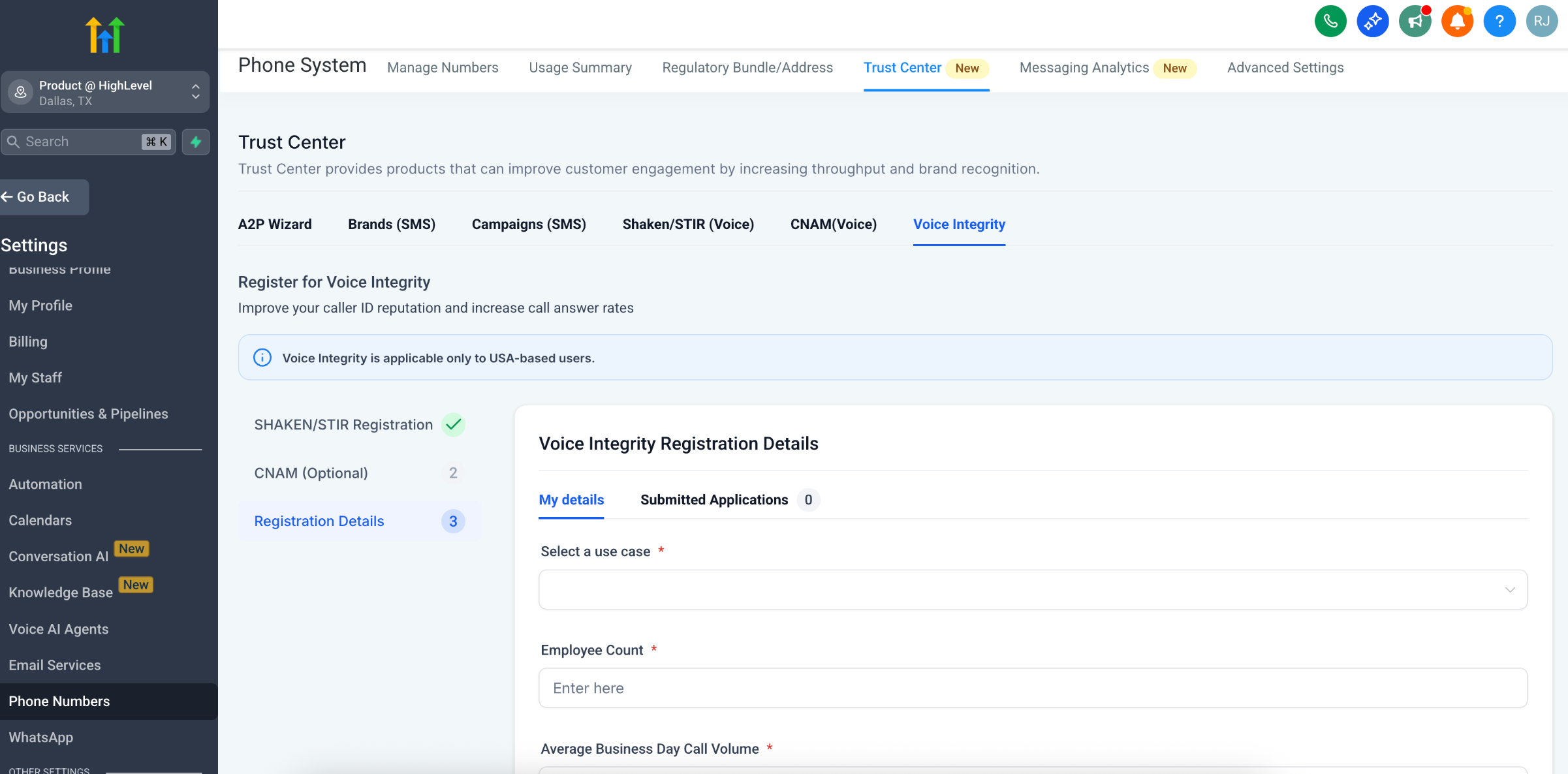
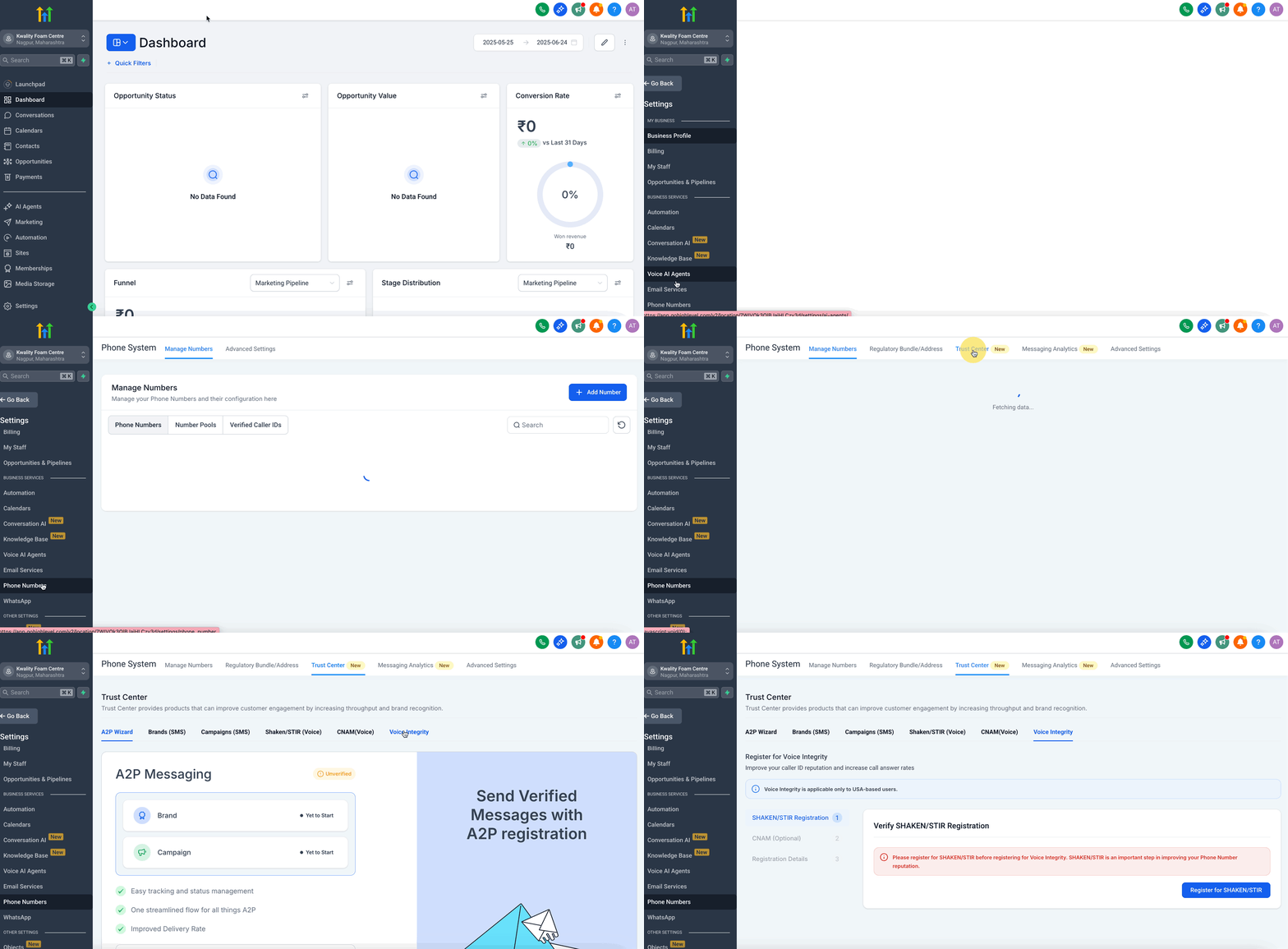
In this guide, you’ll learn how to register your U.S. phone numbers with Patient Copilot’s Voice Integrity feature—leveraging top caller-ID analytics platforms to clear spam flags, repair your caller-ID reputation, and significantly boost your answer rates. * * * ## Voice Integrity with High Level Legitimate calls shouldn’t be mistaken for spam. With Patient Copilot’s Voice Integrity, you can register your U.S. phone numbers with the leading caller-ID analytics firms (First Orion, Hiya, TNS) to remove “spam likely” labels, repair a troubled reputation, and boost your answer rates, especially for numbers that have been blocked or flagged in the past. * * * ## Why Switch on Voice Integrity? - Fix a bad reputation: Clear existing spam flags and restore trust in your caller ID. - Higher answer rates: Studies show calls labeled with a recognized, branded name are far more likely to be answered. - Better deliverability: Legitimate callers avoid unnecessary blocks, so your outreach and support calls reach more customers. Note: Patient Copilot may prompt you to register for Voice Integrity after an unanswered outbound call from the web dialer. This prompt is a shortcut to help you improve future answer rates. * * * ## Before Registering for Voice Integrity Before you enable Voice Integrity, make sure you’ve met the following key requirements. 1. SHAKEN/STIR Registration (required) To prove each outgoing call is authentic, you must have a valid SHAKEN/STIR attestation on your account. 2. CNAM (Caller Name) (recommended) Submitting a branded name alongside your number further enhances trust in analytics platforms. 3. U.S. Phone Numbers Only Voice Integrity currently applies solely to domestic traffic—international numbers are not supported. * * * ## Enabling Voice Integrity Here’s how to activate Voice Integrity in minutes and ensure your calls are marked as legitimate across the major networks. Also, please note that SHAKEN/STIR registration is required to complete the Voice Integrity form. If you don’t already have it, register before proceeding. ### Step 1: Navigate to the Voice Integrity Tab within the Trust Center !(https://assets.patientcopilot.ai/5aa741ed89bf3b02.gif) ### Step 2: Complete the Registration Form Within the Trust Center under the Voice Integrity tab, fill in: - Use Case: Select the type of calls you’ll be making (e.g., sales outreach, customer support).
- Employee Count: Enter your organization’s size.
- Average Business Day Call Volume: Provide your expected daily call count.
- CNAM Details: (Optional) Enter your branded caller name.!(https://assets.patientcopilot.ai/d34f0e182c23bbd4.png) Please Note: Once you click Submit, your Voice Integrity application is typically processed within 2 business days. You can monitor progress at any time by visiting the Submitted Applications tab in the Trust Center. * * * ## What Happens After You Register? Once you submit your information, each of the analytics providers—Hiya, TNS, and First Orion—will review your registration separately. - Fast Turnaround: Most applications clear within two business days.
- Live Updates: You’ll receive a notification once your numbers are approved.
- Label removal may take time to propagate across all networks Please Note: To get started with Voice Integrity, your business must first be registered for SHAKEN/STIR, which requires a valid Employer Identification Number (EIN). However, if you’re a sole proprietor or do not yet have an EIN, you can still improve your phone number reputation using the Free Caller Registry. * * * ## Frequently Asked Questions Q: Will activating Voice Integrity automatically enroll my numbers in SHAKEN/STIR? No. SHAKEN/STIR must be fully configured on your account before you can register for Voice Integrity. Q: Can I register international numbers? At this time, only U.S. numbers are supported. We’re evaluating expansion to other regions. Q: Why is CNAM optional? SHAKEN/STIR is the core requirement for proving call authenticity. Adding a branded CNAM record is recommended to maximize trust and answer rates, but not strictly mandatory. * * * ## Related Articles - **(https://help.patientcopilot.ai/support/solutions/articles/48001229976-overview-of-phone-number-configuration-options)**(https://help.patientcopilot.ai/support/solutions/articles/48001229976-overview-of-phone-number-configuration-options)[Overview of Phone Number Configuration Options](https://help.patientcopilot.ai/support/solutions/articles/48001229976-overview-of-phone-number-configuration-options)
- Using Call Connect to Ensure Accurate Call Status Tracking
- Why are my Calls marked as Spam, and How can I avoid it?(https://help.patientcopilot.ai/support/solutions/articles/48001231665-why-are-my-calls-marked-as-spam-and-how-can-i-avoid-it-)**(https://help.patientcopilot.ai/support/solutions/articles/48001231665-why-are-my-calls-marked-as-spam-and-how-can-i-avoid-it-)**