
Manage Prospect Statuses and Onboarding in Prospecting
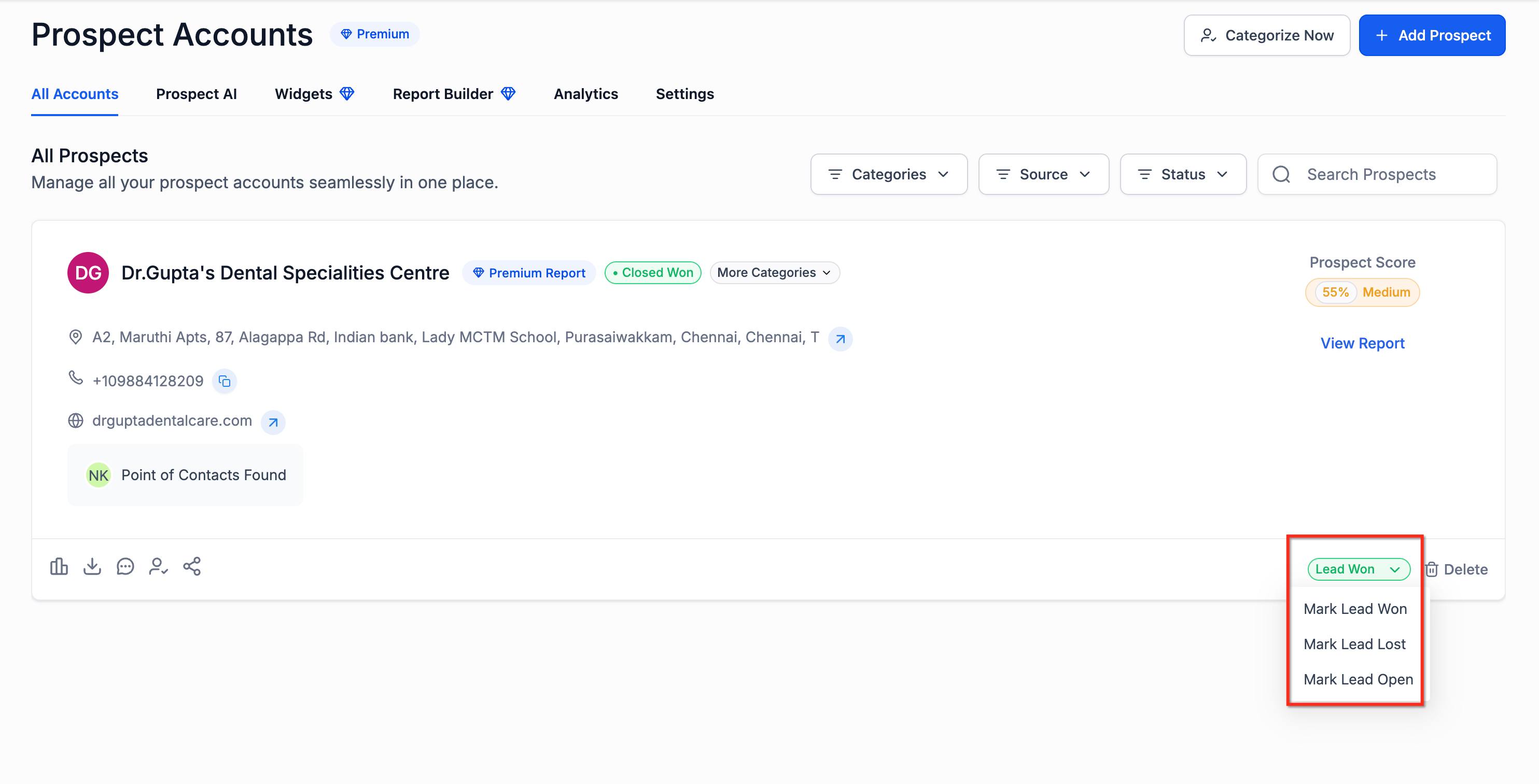
Prospecting now supports a clearer lead lifecycle. You can mark prospects as Open, Closed Won, or Closed Lost, filter them by status, and move won prospects into onboarding faster. In Agency Prospecting, marking a prospect as Closed Won unlocks Create Sub-Account. This helps agencies track outcomes without relying on spreadsheets or external tools. * * * ## What is Prospect Status Management in Prospecting? Prospect status management is a Prospecting feature that helps users track what happens after a lead is generated. Instead of keeping all prospects in one undifferentiated list, users can now update each prospect’s outcome and filter prospects by lifecycle stage. This feature includes: - Prospect Statuses: Open, Closed Won, Closed Lost
- Status-based filters
- Create Sub-Account for won prospects in Agency Prospecting
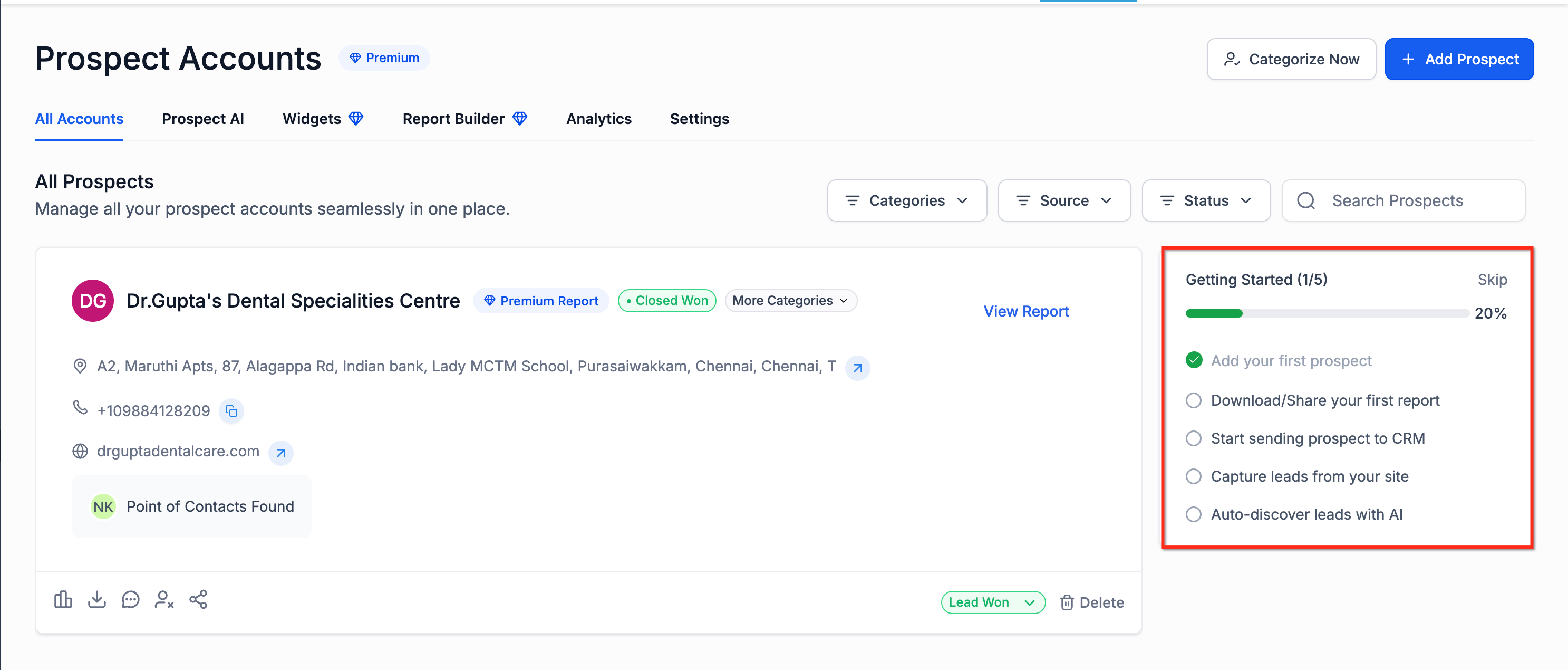
- A Getting Started onboarding card for new Prospecting users This fills a gap in existing Prospecting coverage, which focuses more on lead generation than post-outreach tracking. * * * ## **Key Benefits of Prospect Status Management in Prospecting ** - Track prospect outcomes directly inside Prospecting
- Separate active leads from closed leads
- Identify wins that still need onboarding
- Reduce manual tracking in spreadsheets
- Help new users get started faster with guided onboarding
- Connect prospecting activity to sub-account creation in Agency view * * * ## How to Prospect Status Management in Prospecting ### Update a Prospect’s Status 1. Open Prospecting.
- Open the Prospect Card for the record you want to update.
- Change the status to Open, Closed Won, or Closed Lost. ###!(https://assets.patientcopilot.ai/7d9a3069b07f6686.png) Filter Prospects by Status 1. Go to your saved prospects list in Prospecting.
- Open the Status filter.
- Select one or more of these options: - Open - Closed Won - Closed Lost ###!(https://assets.patientcopilot.ai/282c8165c6bbc063.jpg)**Use the Getting Started Card** 1. Open Prospecting as a new user.
- Review the Getting Started card.
- Complete key actions such as: - Creating your first prospect - Generating and sharing reports - Sending prospects to CRM - Capturing leads - Enabling AI discovery ##!(https://assets.patientcopilot.ai/eb2c4d7c4f1e34fe.png) * * * ## Frequently Asked Questions **Q. What statuses can I assign to a prospect? **You can mark a prospect as Open, Closed Won, or Closed Lost. **Q. Can I filter prospects by status? **Yes. You can filter by Open, Closed Won, Closed Lost, Sub-Account Created, and Sub-Account Not Created. What happens when I mark a prospect as Closed Won? Q. In Agency Prospecting, marking a prospect as Closed Won makes Create Sub-Account available. **Does this replace categories? **No. Categories and status serve different purposes. Categories organize prospects, while status tracks prospect outcome. The categorization article is separate and would need a short cross-reference for this distinction. **Q. Who sees the Getting Started card? **It is intended for users who are new to Prospecting. It hides automatically once users become active or dismiss it enough times, based on the release details you provided. * * * ## Relevant Article - How to Generate Leads Using the Patient Copilot Prospecting Tool
**Use)
- Prospecting at Sub Accounts: Complete Guide Benefits - Prospecting Tool: Categorization for Prospects
- How to Reach Out to Prospect Leads Generated via the Prospecting Tool(https://help.patientcopilot.ai/support/solutions/articles/155000005476-how-to-reach-out-to-prospect-leads-generated-via-the-prospecting-tool?utm_source=chatgpt.com)