
Setting up a Google Developer Account for your Whitelabel Mobile App
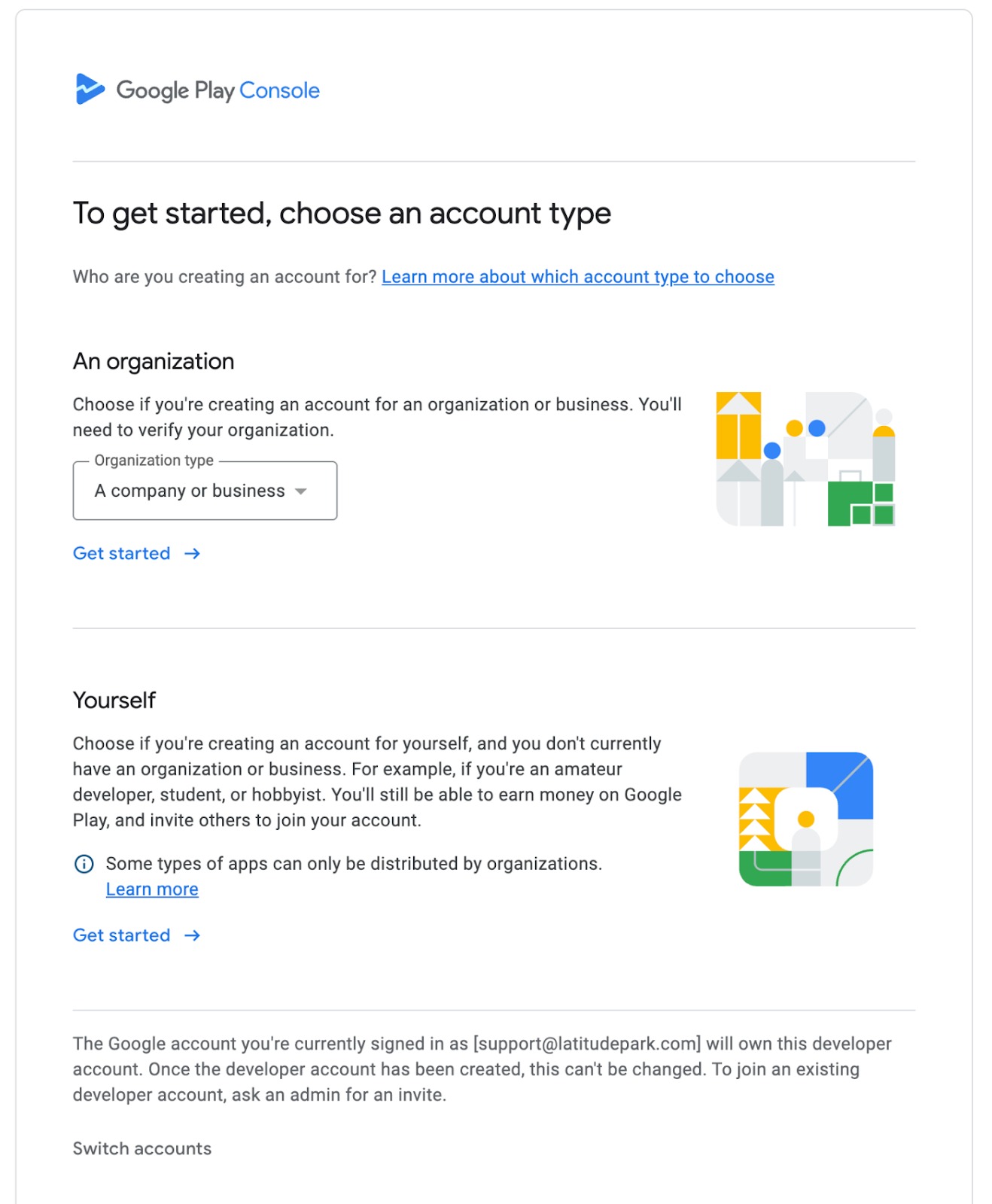
To publish Android apps on the Google Play Store, your business must have its own Google Developer account. Here’s a step-by-step guide to help you get started. * * * ### ✅ What You’ll Need: - Official Business Name – Must match your legal entity - D-U-N-S® Number – Required for verification, register here - Business Details – Email, phone number, business address - Public-Facing Business Website – Clearly displaying your company details - Verified Website Ownership – Via Google Search Console - Google Account – Preferably business-based (not personal Gmail) - One-Time Registration Fee – Payable via card - Government-Issued ID – For identity verification * * * ###? Step-by-Step Registration Process: 1. Go to the Google Play Console Sign in using a business Google account (create one if needed). 2. Accept Developer Agreement Review and accept the Developer Distribution Agreement and click Continue to payment. 3. Pay Registration Fee Enter your card details and pay the USD one-time fee. 4. Enter Business Details Provide your legal business name, address, email, phone number, and website URL. 5. Verify Website Ownership Confirm your domain ownership through Google Search Console. 6. Upload ID for Verification Submit a valid government-issued ID (e.g., passport or driver’s license). 7. Account Activation You’ll receive confirmation via email. Activation may take 24–48 hours. * * * ### ⚡ Tips: - Use a separate Google account for your developer role - Ensure your business website does not include financial terms if you’re publishing a free app - Keep all details accurate and updated for smooth verification * * * ###? Useful Links: - Google Play Console - Video Guide - Google Developer Support _____________________________________________________________________________!(https://assets.patientcopilot.ai/34110bb424eb43d8.jpg) ______________________________________________________________________________!(https://assets.patientcopilot.ai/172988811dd4d36d.jpg)\_\_\_\_\_\_\_\_\_\_\_\_\_\_\_\_\_\_\_\_\_\_\_\_\_\_\_\_\_\_\_\_\_\_\_\_\_\_\_\_\_\_\_\_\_\_\_\_\_\_\_\_\_\_\_\_\_\_\_\_\_\_\_\_\_\_\_\_\_\_\_\_\_\_\_\_\_!(https://assets.patientcopilot.ai/038f8efd06f92f83.png) _________________________________________________________________________________________!(https://assets.patientcopilot.ai/285a5dfffec728a7.png)\_\_\_\_\_\_\_\_\_\_\_\_\_\_\_\_\_\_\_\_\_\_\_\_\_\_\_\_\_\_\_\_\_\_\_\_\_\_\_\_\_\_\_\_\_\_\_\_\_\_\_\_\_\_\_\_\_\_\_\_\_\_\_\_\_\_\_\_\_\_\_\_\_\_\_\_\_\_\_\_\_\_\_\_\_\_\_\_\_\_!(https://assets.patientcopilot.ai/3532266c55d38c28.png)\_\_\_\_\_\_\_\_\_\_\_\_\_\_\_\_\_\_\_\_\_\_\_\_\_\_\_\_\_\_\_\_\_\_\_\_\_\_\_\_\_\_\_\_\_\_\_\_\_\_\_\_\_\_\_\_\_\_\_\_\_\_\_\_\_\_\_\_\_\_\_\_\_\_\_\_ Was this article helpful? That’s Great! Thank you for your feedback Sorry! We couldn’t be helpful Thank you for your feedback Feedback sent We appreciate your effort and will try to fix the article
%5C_%5C_%5C_%5C_%5C_%5C_%5C_%5C_%5C_%5C_%5C_%5C_%5C_%5C_%5C_%5C_%5C_%5C_%5C_%5C_%5C_%5C_%5C_%5C_%5C_%5C_%5C_%5C_%5C_%5C_%5C_%5C_%5C_%5C_%5C_%5C_%5C_%5C_%5C_%5C_%5C_%5C_%5C_%5C_%5C_%5C_%5C_%5C_%5C_%5C_%5C_%5C_%5C_%5C_%5C_%5C_%5C_%5C_%5C_%5C_%5C_%5C_%5C_%5C_%5C_%5C_%5C_%5C_%5C_%5C_%5C_%5C_%5C_%5C_%5C_%5C_%5C_!(https://assets.patientcopilot.ai/038f8efd06f92f83.png)
%5C_%5C_%5C_%5C_%5C_%5C_%5C_%5C_%5C_%5C_%5C_%5C_%5C_%5C_%5C_%5C_%5C_%5C_%5C_%5C_%5C_%5C_%5C_%5C_%5C_%5C_%5C_%5C_%5C_%5C_%5C_%5C_%5C_%5C_%5C_%5C_%5C_%5C_%5C_%5C_%5C_%5C_%5C_%5C_%5C_%5C_%5C_%5C_%5C_%5C_%5C_%5C_%5C_%5C_%5C_%5C_%5C_%5C_%5C_%5C_%5C_%5C_%5C_%5C_%5C_%5C_%5C_%5C_%5C_%5C_%5C_%5C_%5C_%5C_%5C_%5C_%5C_%5C_%5C_%5C_%5C_%5C_%5C_%5C_%5C_%5C_%5C_%5C_%5C_%5C_!(https://assets.patientcopilot.ai/3532266c55d38c28.png)%5C_%5C_%5C_%5C_%5C_%5C_%5C_%5C_%5C_%5C_%5C_%5C_%5C_%5C_%5C_%5C_%5C_%5C_%5C_%5C_%5C_%5C_%5C_%5C_%5C_%5C_%5C_%5C_%5C_%5C_%5C_%5C_%5C_%5C_%5C_%5C_%5C_%5C_%5C_%5C_%5C_%5C_%5C_%5C_%5C_%5C_%5C_%5C_%5C_%5C_%5C_%5C_%5C_%5C_%5C_%5C_%5C_%5C_%5C_%5C_%5C_%5C_%5C_%5C_%5C_%5C_%5C_%5C_%5C_%5C_%5C_%5C_%5C_%5C_%5C_%5C)