How to create your Whitelabel Community
- Home
- Knowledge base
- Memberships & Communities
- Communities
- … - Knowledge base - Memberships & Communities - Communities
- How to create your Whitelabel Community
 Sorry! nothing found for Modified on: Mon, 11 Nov, 2024 at 7:32 AM Creating a white-label community inside a Patient Copilot (Patient Copilot) subaccount involves customizing the community features to match your brand. Here’s a step-by-step guide: ### 1. Access the Subaccount in Patient Copilot - Log in to Patient Copilot.
- Navigate to the sub-account where you want to create the community.
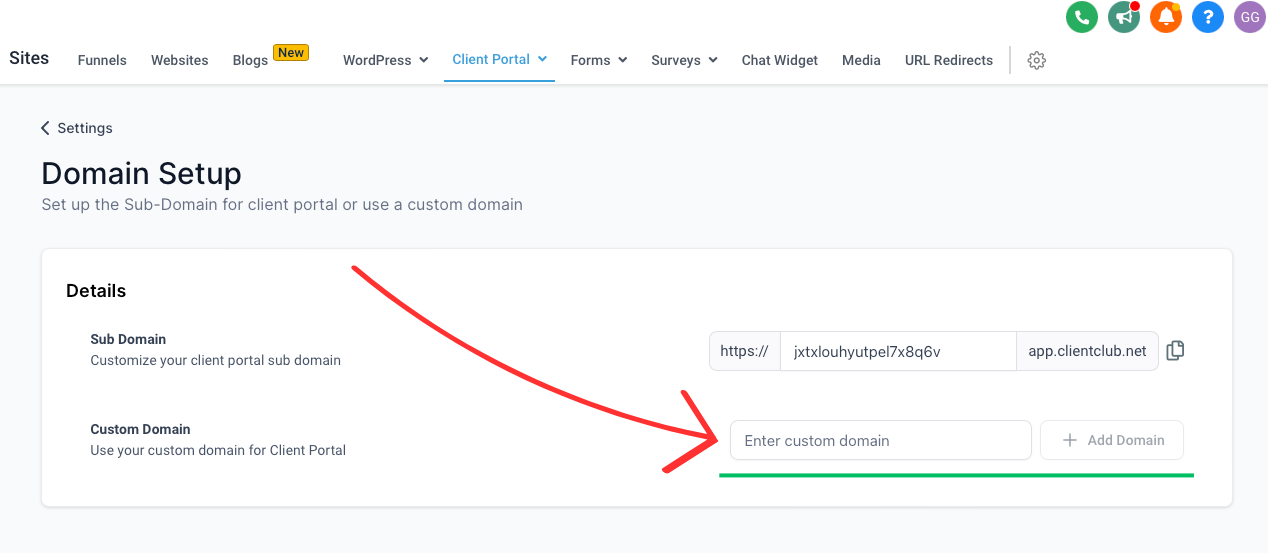
- Head over to Membership > Communities ### 2. Set Up the Custom Domain (White-Labeling) - In Community Settings > Domains, add a custom domain (or subdomain) to host the community (inside a client portal). For example,
community.yourdomain.com. - Follow the instructions to update your DNS settings to point to Patient Copilot’s servers. This will make your community fully white-labeled under your domain.
- Follow this link for brief on what is a domain - Note: The domain settings would be for Client Portal since a community exists within a client portal!(https://assets.patientcopilot.ai/659f0a0eee2aec2d.png) 3. How to create a community? Head over to this link for all community related help Was this article helpful? That’s Great! Thank you for your feedback Sorry! We couldn’t be helpful Thank you for your feedback Feedback sent We appreciate your effort and will try to fix the article