Create Audio File For Voicemail (and Drops)
You can create a custom recording to use as your voicemail or in a voicemail drop, but it needs to be the right format and quality so it is compatible with all carriers. * * * ## What is a Custom Voicemail The system has pre-recorded messages and it can do speech to text. A custom voicemail is where you record your own audio and upload the file. This file can be played instead of a system file as your voicemail message or it can be used in voicemail drops where you leave a message in someone else’s voicemail (usually a customer). * * * ## Record Audio Online Google “record mp3 online” or try one of these websites: - https://www.rev.com/onlinevoicerecorder
- https://recordmp3online.com/ * * * ## Adjust Audio Quality Online Bring the quality of the audio down to what works for all carriers. Search for “online audio converter” or try one of these websites: - https://online-audio-converter.com/
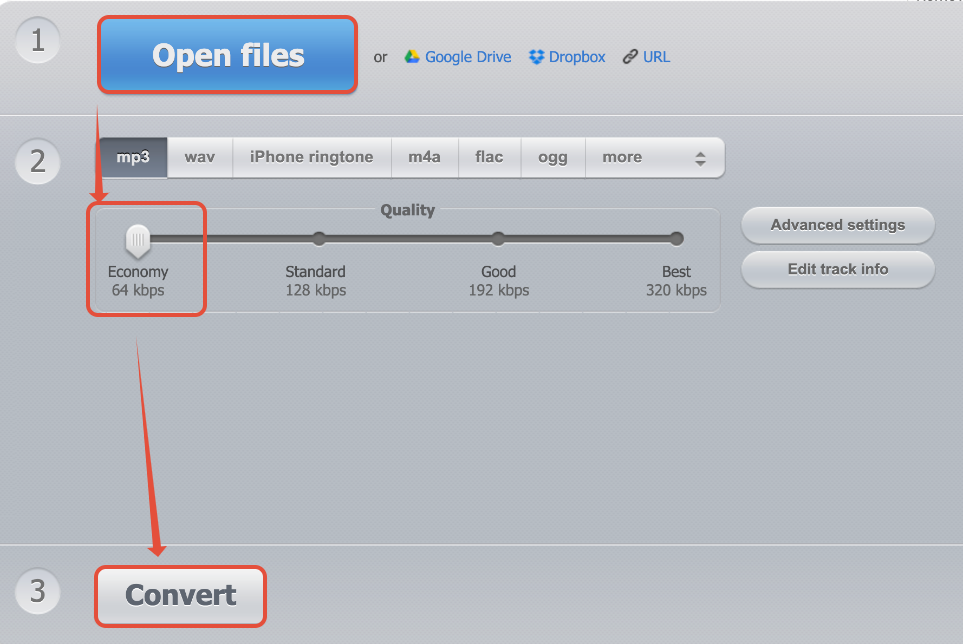
- https://onlineaudioconverter.com/ Select the smallest / economy / 64 kbps option.!(https://assets.patientcopilot.ai/da3b845e408073f1.png) * * * ## Desktop Audio Applications You can get desktop applications that record and convert audio. - https://www.audacityteam.org/
- https://lame.sourceforge.io/
- https://obsproject.com/ ### How To Use Audacity 1. Drag and drop your audio file into audacity 2. On the bottom left, lower the project rate down to 8000 3. Tracks -> Resample… -> 8000 -> OK 4. File -> Export Audio… -> Name the File in the Save As-> Format: Other uncompressed files -> Options -> Header: WAV -> Encoding: U-Law -> OK -> Save -> OK Was this article helpful? That’s Great! Thank you for your feedback Sorry! We couldn’t be helpful Thank you for your feedback Feedback sent We appreciate your effort and will try to fix the article