
Campaign Verify (CV) Token Requirements for Political Toll-Free Messaging
Political Election Campaign toll-free messaging now requires a valid Campaign Verify (CV) Auth Token during Toll-Free Verification (TFV). Beginning February 17, 2026: - All new political toll-free verifications require a valid token
- Existing approved political toll-free numbers must also comply
- Political messaging without a valid token may be rejected or restricted by carriers * * * ## What is a Campaign Verify (CV) Token? A Campaign Verify (CV) Auth Token is a verification credential required for Political Election Campaign messaging using toll-free numbers. The token is issued through Campaign Verify after completing political organization identity verification. The token is required during the Toll-Free Verification process for political messaging use cases. * * * ## Who Is Affected? This requirement applies to: - Political campaigns
- Political organizations
- Agencies sending political messaging
- Existing toll-free numbers approved for political messaging Non-political toll-free messaging is not affected. * * * ## Updated Toll-Free Verification Fields The Toll-Free Verification flow now includes additional business verification fields. Depending on your business type, you may be required to provide: - Business DBA (Doing Business As) name
- Legal Entity Type
- Business Registration Authority
- Business Registration Number
- Business Registration Country
- Website URL
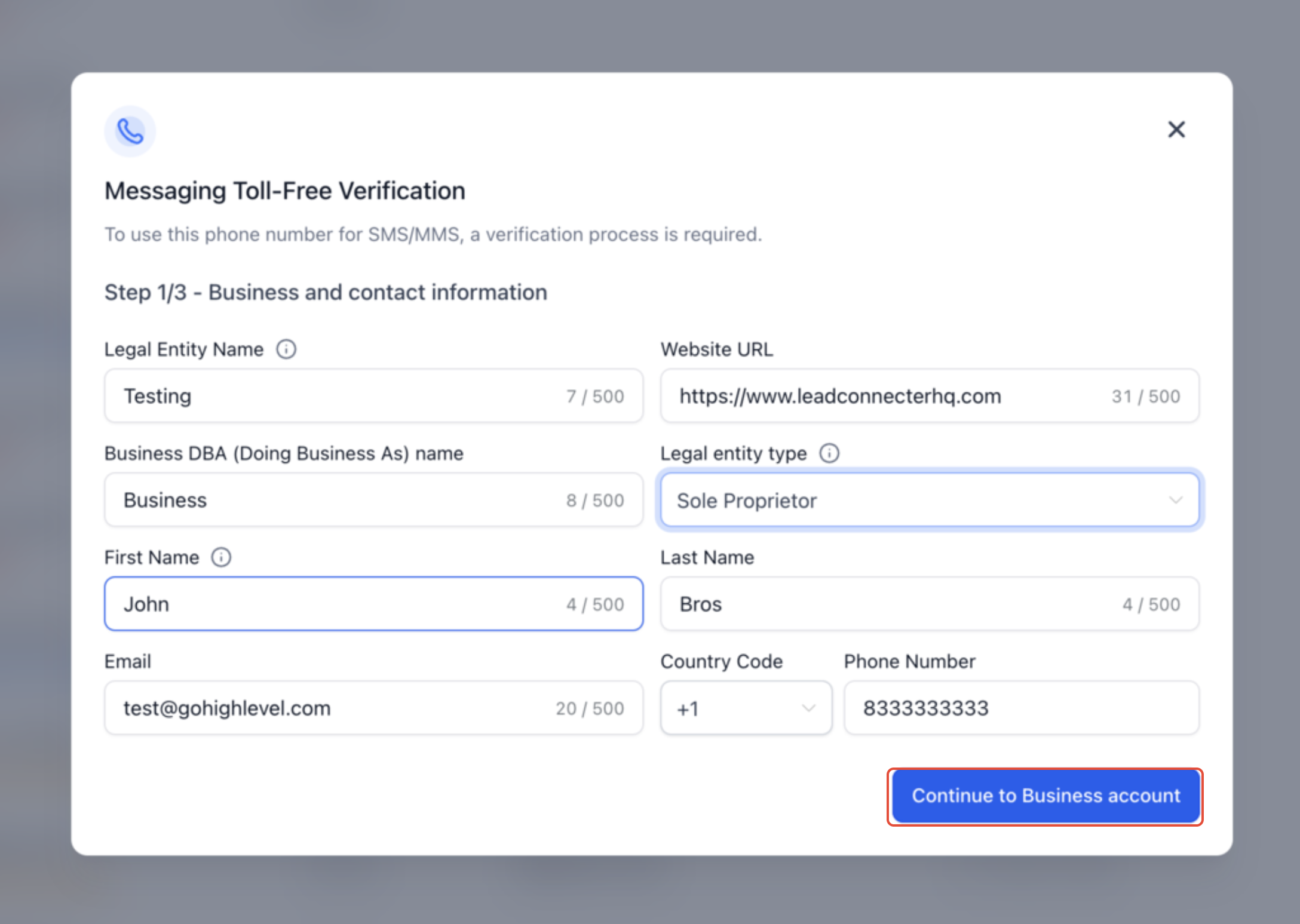
- Business contact information These fields help carriers validate business identity and improve Toll-Free Verification approval reliability. * * * ## !(https://assets.patientcopilot.ai/ac266ee563aae831.png) This screenshot demonstrates: - Updated Business & Contact Information step
- Legal Entity Type field
- DBA field
- Additional verification requirements * * * ## How to Obtain a Campaign Verify Token 1. Visit: https://www.campaignverify.org/
- Complete the identity verification process
- Obtain your Campaign Verify Auth Token
- Copy the token for use during Toll-Free Verification inside Patient Copilot Patient Copilot does not issue Campaign Verify tokens directly. * * * ## Add the CV Token During Toll-Free Verification 1. Navigate to: Settings → Phone Numbers → Manage Numbers
- Open the Toll-Free Verification form
- Select: Political Election Campaigns as the use case category 4. Enter your Campaign Verify Auth Token
- Complete and submit the verification form * * * ## !(https://assets.patientcopilot.ai/8306dc4e0e6ee2bc.png) Place the second screenshot directly below this section. This screenshot demonstrates: - Political Election Campaign use case
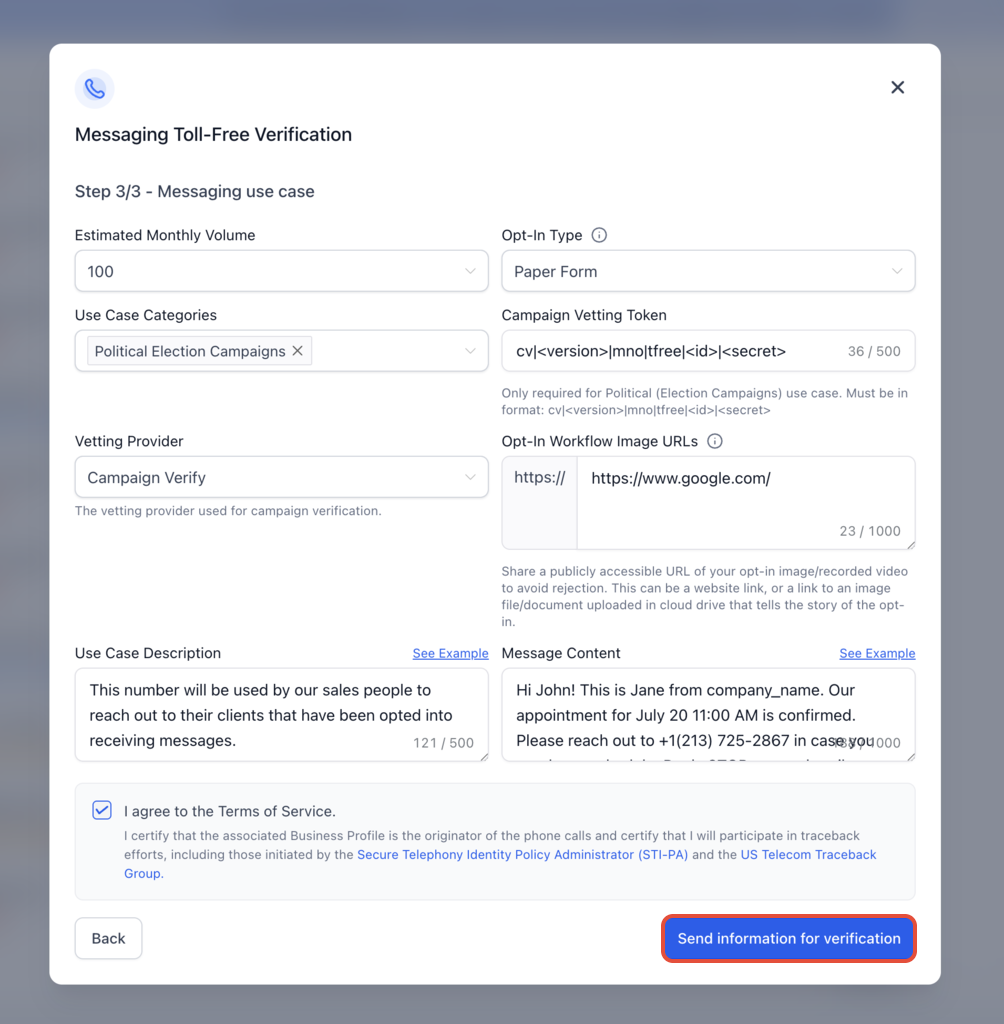
- Campaign Verify Token field
- Vetting Provider selection
- Political messaging verification requirements * * * ## Important Compliance Information Beginning February 17, 2026: - Political toll-free messaging without a valid CV token may be blocked or restricted
- Existing approved political toll-free numbers must also comply with the updated requirements Campaign Verify tokens are required only for Political Election Campaign use cases. * * * ## Frequently Asked Questions Q: Do I need a Campaign Verify token for non-political messaging? A: No. Campaign Verify tokens are required only for Political Election Campaign use cases. Q: Where do I obtain a Campaign Verify token? A: Tokens are issued directly through CampaignVerify.org after completing identity verification. Q: What happens if I do not add a valid token? A: Political toll-free messaging may be rejected or restricted after February 17, 2026. Q: Can existing approved political toll-free numbers continue sending messages without a token? A: Existing political toll-free numbers must also comply with the updated requirements by the deadline. Q: Does this replace A2P 10DLC registration? A: No. Toll-Free Verification and A2P 10DLC are separate registration systems. * * * ## Related Articles - Toll-Free Number Verification Guide for LC-Phone (US/Canada)
- Identity Verification for Phone Number Purchases (US/CA/PR/IL)