Populate Custom Fields and capture in submission using Custom HTML/Javascript Logic
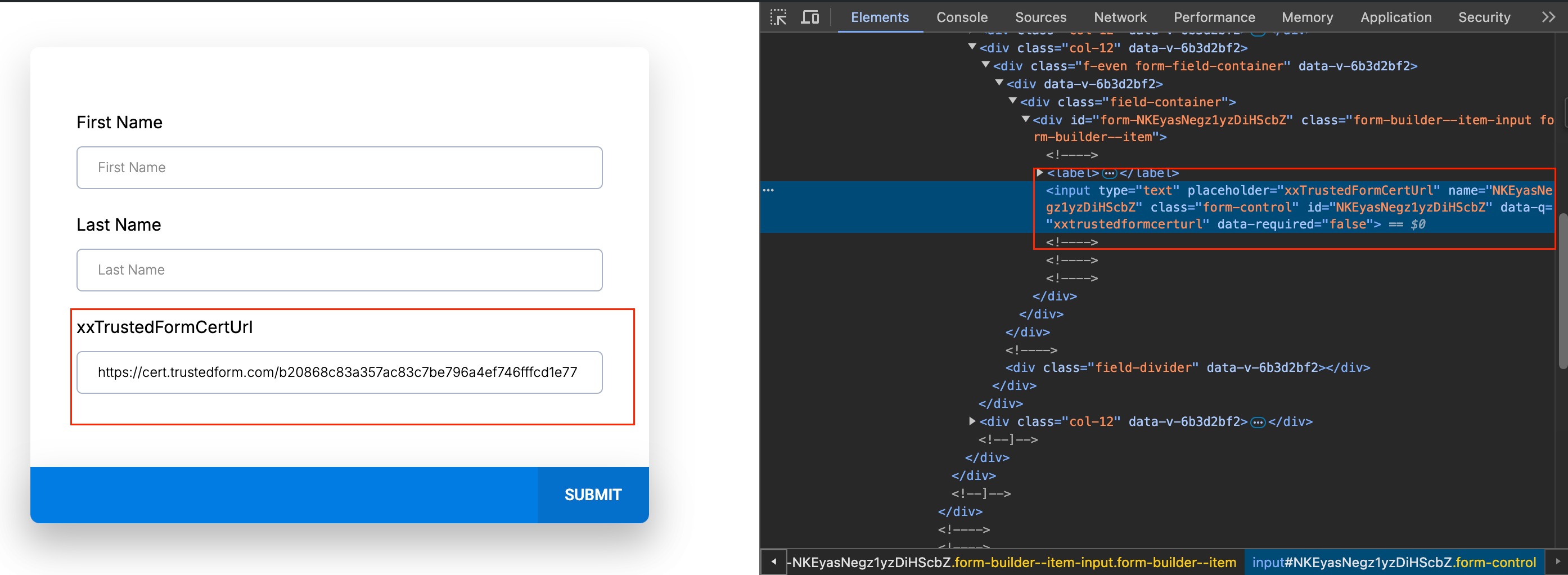
Auto populating the existing custom field in forms / Survey using custom HTML/Javscript and later saved in submisison is simple and straightforward. Retrieve the Custom Field ID: - Go to the Preview of the form. - Right-click on the page and select ‘Inspect.’ - Select the mouse pointer tool. - Click on the “Custom Field.” - Copy the ID from the name and ID properties. Example: If you created a custom field named `xxTrustedFormCertUrl`, follow the above steps to get its ID.!(https://assets.patientcopilot.ai/4c0726a079dc8bf3.jpg) Note: **myData** is just for example. In the customer custom HTML/Javascript code. Customer have to figure it out where is the captured data and replace the **myData** document.getElementsByName(‘customFieldId’)[0].value = myData; document.getElementsByName(‘customFieldId’)[0].dispatchEvent(new Event(“input”)); Was this article helpful? That’s Great! Thank you for your feedback Sorry! We couldn’t be helpful Thank you for your feedback Feedback sent We appreciate your effort and will try to fix the article