Cold Email Inbound Setup Mailgun
This guide walks you through setting up inbound email handling using Mailgun for your domain in Patient Copilot. It also explains important limitations around root domains vs subdomains to help you avoid common setup issues. * * * ## **What is Inbound Email? ** Inbound email allows you to receive and process emails sent to your domain. With Mailgun, inbound emails can be: - Forwarded to another email address
- Sent to a webhook
- Logged and processed inside workflows * * * ## Root Domain vs Subdomain Before setting up inbound email, it is critical to understand how domain configuration works. ### Key Limitation A domain can only have one set of MX (Mail Exchange) records. - You cannot use Mailgun and another email provider (like Gmail or Outlook) to receive emails on the same domain simultaneously. ### What This Means in Practice | If your MX records point to | Then… | | --- | --- | | Mailgun | Emails are handled by Mailgun (no inbox) | | Google Workspace / Outlook | Emails go to your inbox (Mailgun cannot receive them) | Mailgun does not provide an inbox — it only routes or forwards emails. * * * ## Why Adding Mailgun MX Records to Root Domain Fails If your root domain (e.g., yourdomain.com) is already connected to an email provider like Google Workspace: - Adding Mailgun MX records alongside existing MX records will not work reliably
- Email delivery may fail or behave unpredictably This is because email systems are not designed to split inbound handling across multiple providers. ### Recommended Setup (Best Practice) To avoid conflicts and ensure reliable email delivery: Use a Subdomain for Mailgun - Mailgun domain: mg.yourdomain.com
- Root domain (yourdomain.com) remains connected to Gmail or Outlook - Send emails via Mailgun
- Receive emails in your normal inbox
- Avoid MX conflicts * * * ## Using Root Domain with Mailgun (Not Recommended) If you choose to configure Mailgun on your root domain: - Point your root domain MX records to Mailgun - Losing your existing inbox (Gmail/Outlook will stop receiving emails)
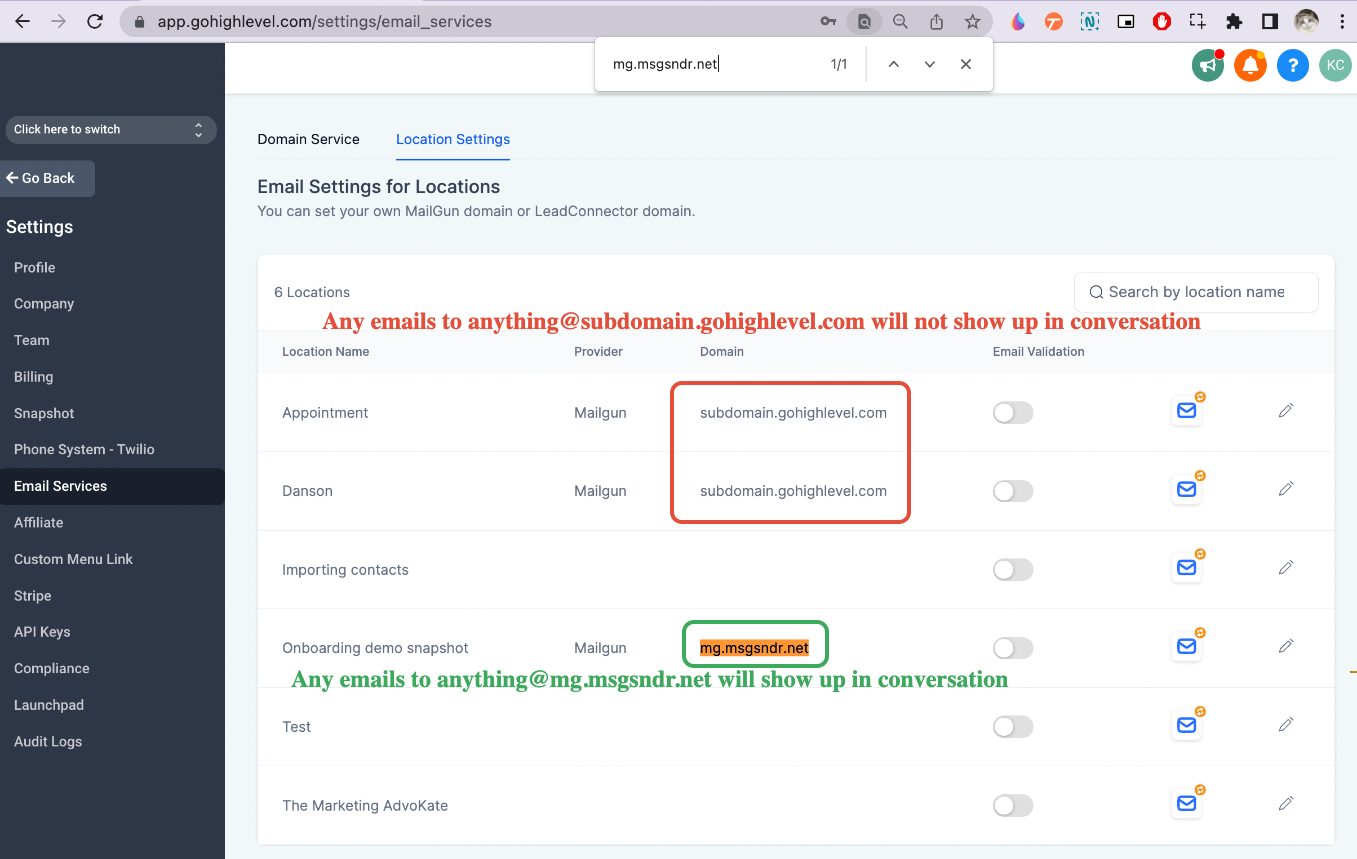
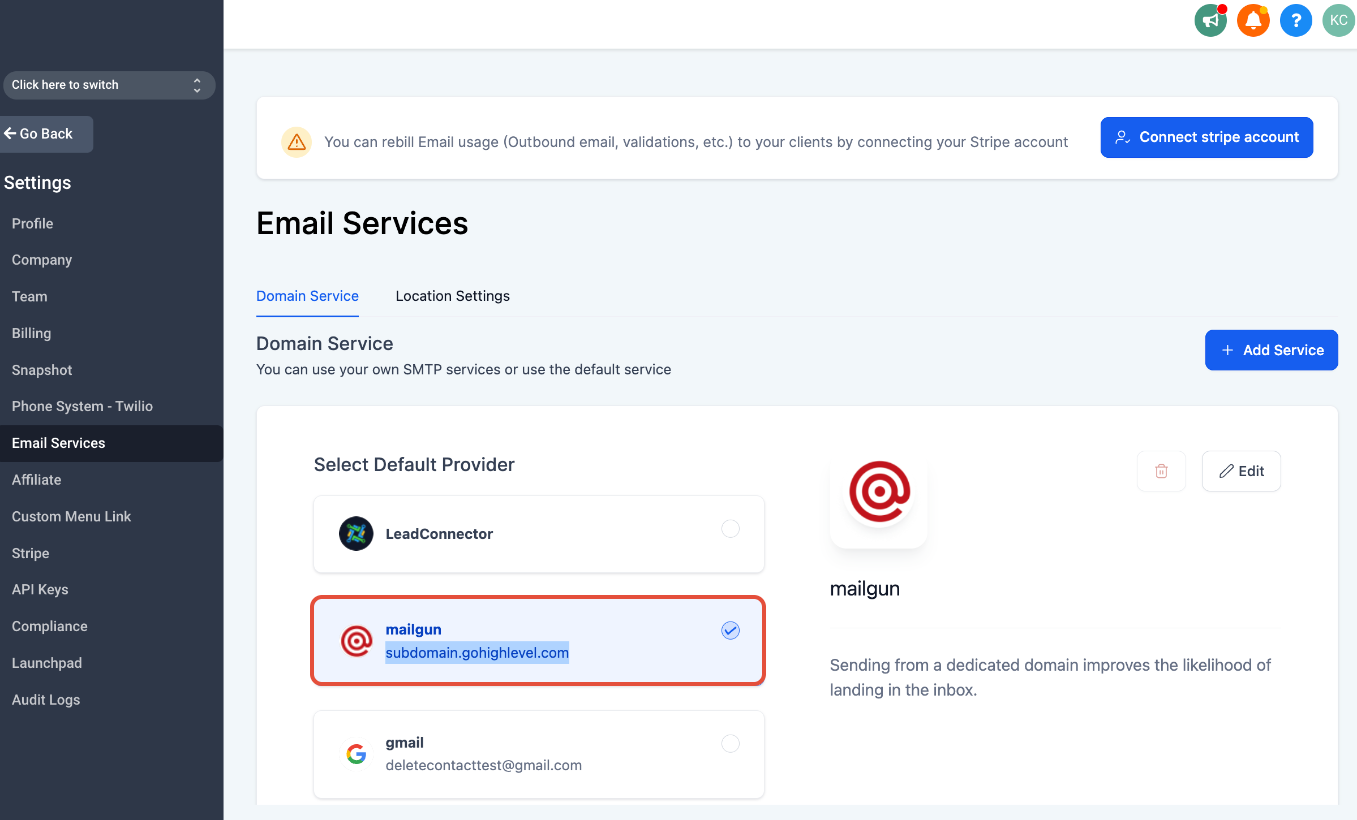
- Emails being processed only via Mailgun routes You will not have a traditional inbox, only routing/forwarding. * * * ## Setup Steps for Inbound Email (Mailgun) ### 1. Set up Mailgun Check out how to set up Mailgun We will set up agency.com / mg.agency.com with Mailgun You can use the same Mailgun account for all sub-accounts E.g. If you have a domain like agency.com, you can set up a unique subdomain for each sub-account like subaccountname.agency.com so each Sub-Account will have its own Mailgun subdomain set up to capture all email replies. If your clients have their own domain, you can also set up a unique domain/subdomain for them. But if their main domain is already used for another email service, we will need to use a subdomain in this case. That way we will know which accounts to route the email to. ### 2. Make sure the Mailgun domain is configured for ONE sub-account only As long as there is only ONE sub-account mapped to that mailgun domain you just set up, it will route all inbound emails to that sub-account. Check Agency View > Settings > Email Services > Location Settings.!(https://assets.patientcopilot.ai/3e7773870441ab66.png) If you are using the same subdomain/domain for multiple Patient Copilot sub-accounts, we will not know which sub-account to route the email replies to when the lead is emailing the reply-to email address directly instead of replying to the email sent from Patient Copilot.!(https://assets.patientcopilot.ai/bfe0f725ccceb61e.png) If you only configure the domain/subdomain for one sub-account but it’s still not working, check if the same domain is configured in the Domain Services tab as well!(https://assets.patientcopilot.ai/8c6b770c5828f852.png) Please reach out to support if you recall that there might be a deleted sub-account with the same Mailgun domain selected. ### 3. Test If you set up domain.com, We can then use testing@domain.com to capture incoming emails. So if the contact initiates the Conversation by sending an email to anything@domain.com, it will show up in the Conversation tab. If you set up a subdomain like mg.domain.com, We can then use anything@mg.domain.com to capture incoming emails. * * * ## Example Setup Scenarios ### Scenario 1: Standard Setup (Recommended) - Sending domain: mg.yourdomain.com
- Inbox: Google Workspace on yourdomain.com Works perfectly for both sending and receiving ### Scenario 2: Mailgun Only (Advanced Use Case) - MX → Mailgun on root domain Emails processed via routes No inbox access Quick Decision Guide | Goal | Recommended Setup | | --- | --- | | Send emails only | Use Mailgun subdomain | | Send + receive in inbox | Root → Gmail, Subdomain → Mailgun | | Receive via Mailgun routes | Point MX to Mailgun (no inbox) | ### Common Mistakes to Avoid - Adding Mailgun MX records without removing existing ones
- Trying to use Gmail and Mailgun for inbound on the same domain
- Expecting Mailgun to provide a mailbox ### Final Recommendation Always use a subdomain for Mailgun when setting up cold email and inbound routing. - Clean separation of responsibilities
- No disruption to your primary inbox
- Reliable email delivery and routing If you still need help, contact support or consult your DNS provider to verify your configuration. * * * ## Frequently Asked Questions Q. Can I use Mailgun and Gmail on the same domain? No. A domain can only have one set of MX records for receiving emails. If MX records point to Gmail, Mailgun cannot receive emails for that domain, and vice versa. Q. Why doesn’t adding Mailgun MX records to my root domain work? Because your domain likely already has MX records (e.g., Google Workspace or Outlook). Email systems cannot reliably split inbound emails between multiple providers, which causes failures or inconsistent delivery. Q. Can I still send emails from my root domain using Mailgun? Yes. Sending emails is not affected by MX records. You can send using Mailgun even if your root domain is connected to another email provider. Q. Does Mailgun provide an inbox? No. Mailgun does not provide a mailbox interface. It only routes, forwards, or processes incoming emails via routes or webhooks. Q. What is the recommended setup for cold email and replies? Use a subdomain for Mailgun (e.g., mg.yourdomain.com) and keep your root domain connected to Gmail or Outlook for receiving emails. Q. Can I use the root domain with Mailgun for inbound emails? Yes, but only if you point your MX records to Mailgun. This will disable your existing inbox (Gmail/Outlook), as Mailgun will handle all incoming emails. Q. Why does Mailgun recommend using a subdomain? Using a subdomain prevents conflicts with your main inbox, protects domain reputation, and ensures stable email delivery.