Using Your Existing Phone Number to Place Voice Calls
Voice calling in Patient Copilot is now easier to try because users can place calls using a phone number they already own. This removes the need to purchase a Patient Copilot number before testing outbound voice calling. Businesses can start calling leads and customers faster while deciding whether they need a full Patient Copilot phone number setup later. * * * ## What is Calling With Your Existing Phone Number? Calling with your existing phone number allows users to place outbound voice calls from Patient Copilot without first purchasing a Patient Copilot phone number. This helps new users, agencies, and locations test voice calling with less setup effort and lower upfront commitment. With this update, users can use a phone number they already own to make calls directly from Patient Copilot. This is useful for businesses that want to try voice calling before setting up a dedicated Patient Copilot number, porting an existing number, or configuring a full phone system. * * * ## Key Benefits of Calling With Your Existing Phone Number Using an existing number helps teams start voice conversations faster. It reduces setup friction and gives users a simple way to experience outbound calling before making a longer-term phone system decision. - Lower Upfront Setup: Users can try voice calling without purchasing a Patient Copilot number first.
- Faster Testing: New locations can make calls sooner using a phone number they already own.
- Easier Adoption: Agencies can help clients experience voice calling without requiring number purchase as the first step.
- Flexible Phone Setup: Users can test outbound calling first and decide later whether to purchase, port, or configure a Patient Copilot-managed number.
- Improved Access to Calling: Locations without a Patient Copilot phone number can still explore voice calling inside Patient Copilot. * * * ## When to Use an Existing Phone Number for Voice Calls Using an existing number is best for users who want to quickly try outbound voice calling in Patient Copilot. This option is especially helpful when a business already has a trusted phone number and wants to start calling contacts before completing a full phone setup. Use this option when: - You want to try voice calling before purchasing a Patient Copilot number.
- Your location does not currently have a phone number in Patient Copilot.
- You already own a business phone number you want to use for outbound calls.
- You want a low-effort way to test calling workflows with leads or customers.
- You are helping a client evaluate Patient Copilot voice calling before completing phone number setup. This option is not the same as porting a number into Patient Copilot. Porting or purchasing a Patient Copilot number may still be needed for full phone system functionality, depending on the use case. * * * Understanding the difference between using an existing number and purchasing a Patient Copilot number helps users choose the right setup. An existing number is useful for trying outbound calling, while a Patient Copilot-managed number may be needed for more complete phone system configuration. | Option | Best For | Notes | | --- | --- | --- | | Existing owned number | Trying outbound voice calling quickly | Does not require purchasing a Patient Copilot number first | | Patient Copilot phone number | Full phone setup inside Patient Copilot | Useful for managed calling, SMS, routing, and phone number configuration | | Ported number | Moving an existing business number into Patient Copilot | Useful when the business wants Patient Copilot to manage the number directly | The existing Knowledge Base includes verified caller ID setup for using your number for voice calls, outbound calling through the web dialer, and LC Phone billing details. These articles may be helpful when configuring or expanding calling functionality. * * * ## Important Limitations and Expectations This feature is designed to reduce the barrier to trying voice calling. Setting expectations helps users understand what this option does and does not replace before they begin calling from Patient Copilot. 1. Purchasing a Patient Copilot number is no longer required before placing voice calls. 2. Support for placing voice calls using a phone number the user already owns. 3. Usage charges may still apply for voice calling. Review LC Phone billing details for current voice call pricing and related costs. 4. Using an existing number for outbound calling is different from porting the number into Patient Copilot. 5. Users who need full phone system functionality may still need to purchase, port, or configure a Patient Copilot-managed number. * * * ## How To Setup Calling With Your Existing Phone Number Proper setup ensures Patient Copilot can recognize the phone number you want to use and allows you to start outbound calling with fewer interruptions. Verifying or selecting the correct number also helps contacts recognize your business when you call. Follow these steps to place a voice call using an existing phone number: 1. Log in to Patient Copilot and open the correct sub-account.
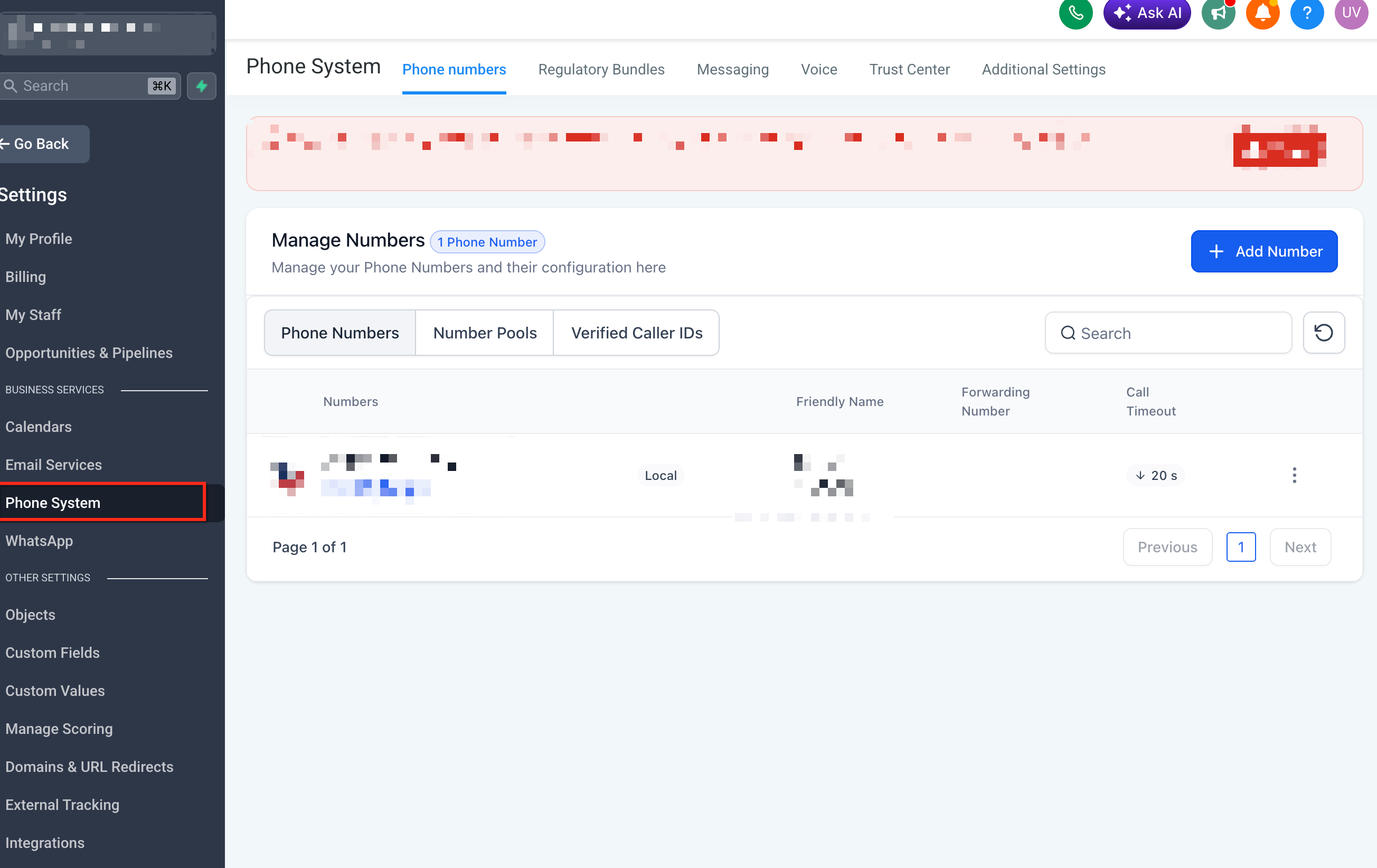
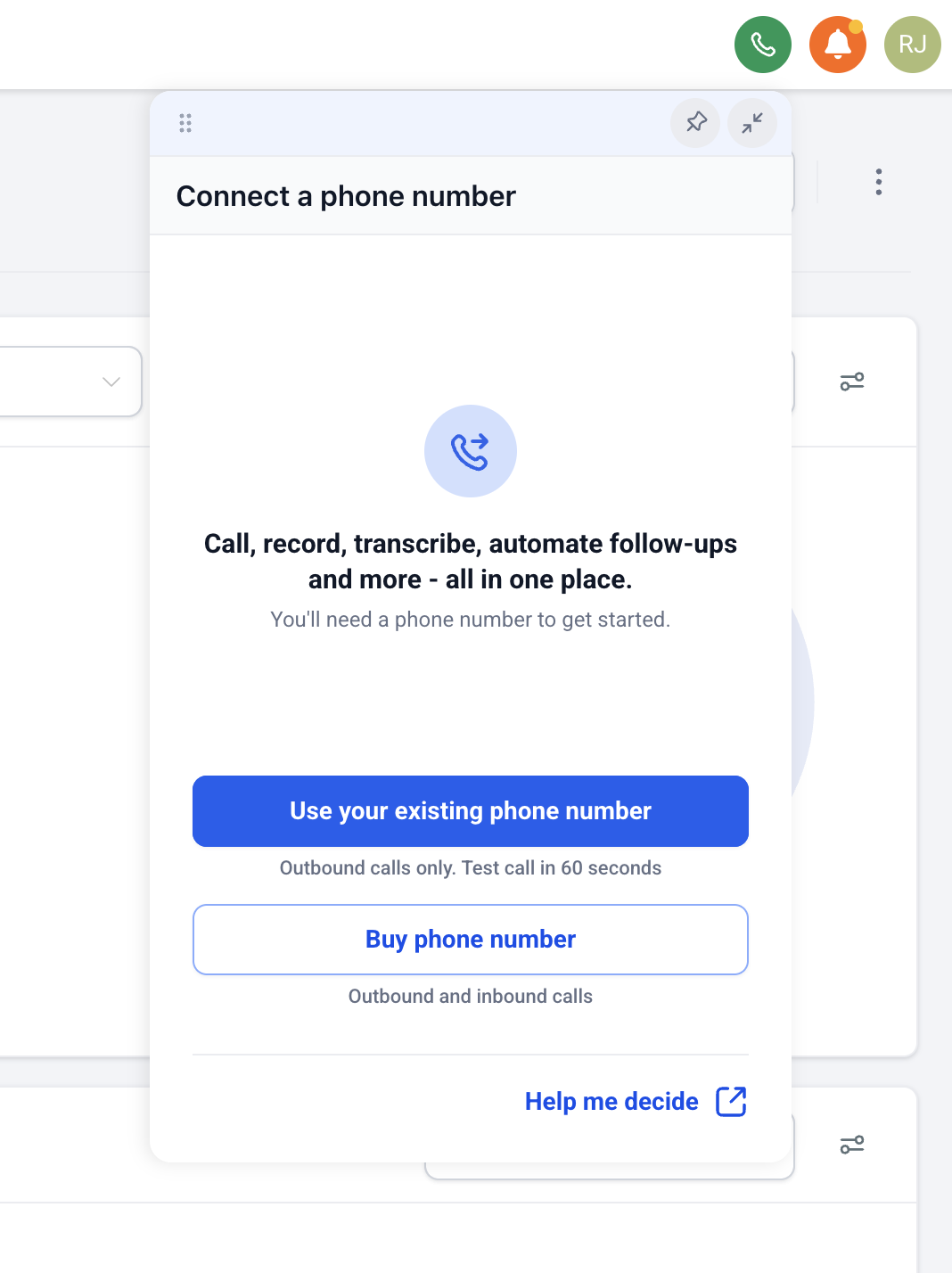
- Navigate to the Phone System available in the Settings where outbound calls are placed.!(https://assets.patientcopilot.ai/7807d3c885507b3d.png) 3. Choose the option to use an existing phone number, if prompted.!(https://assets.patientcopilot.ai/f8734e8c505a3783.png) 4. Enter or select the phone number you already own.
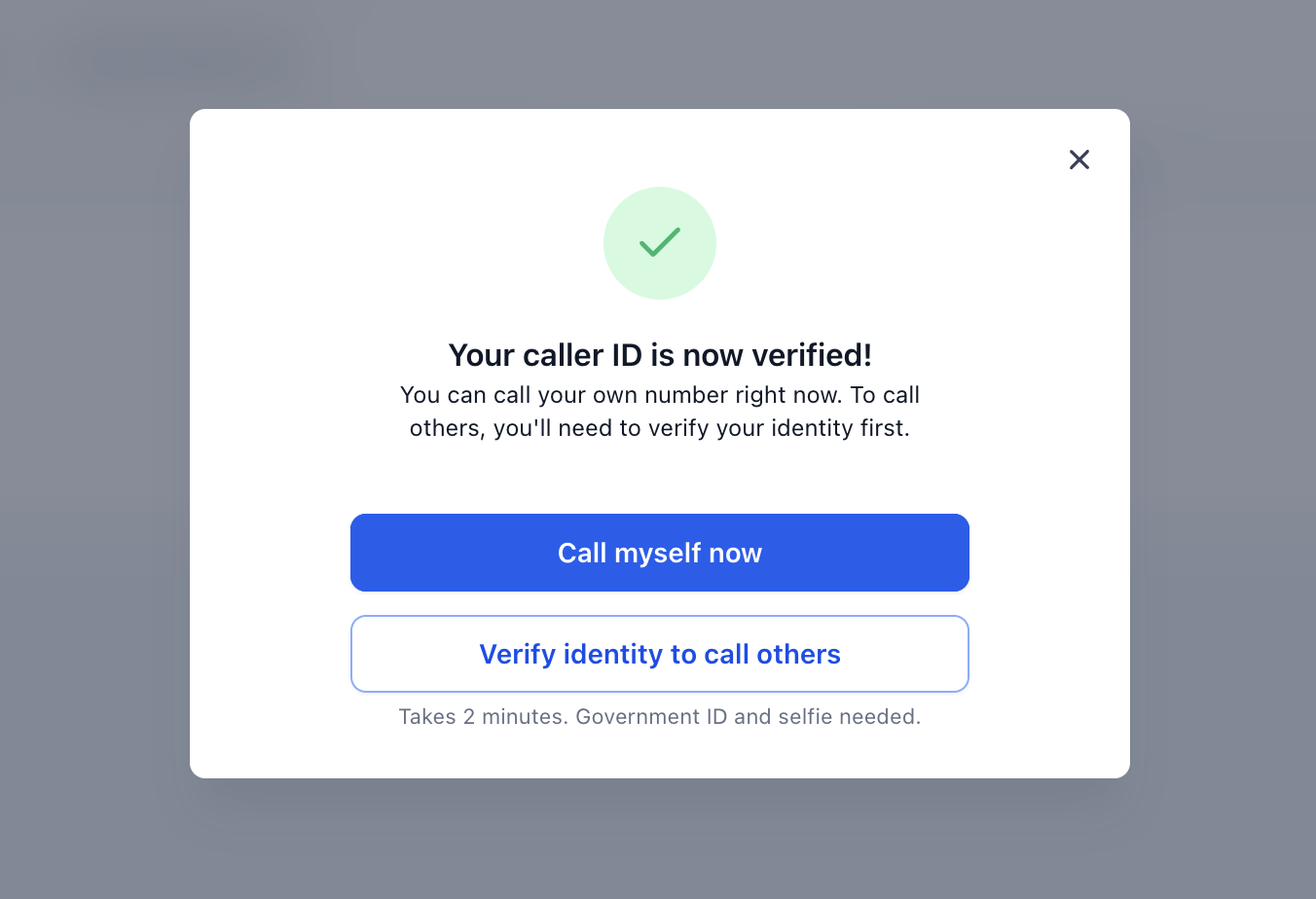
- Complete verification steps shown in Patient Copilot.!(https://assets.patientcopilot.ai/c877701cb21f7c64.png)!(https://assets.patientcopilot.ai/38351e91f7e007e3.png) - If a verification call is required, answer the call and enter the provided verification code. - The existing verified caller ID flow in Patient Copilot uses a verification call and code to confirm ownership of the number.
- Open the Patient Copilot dialer.
- Select the existing number as the calling number, if a “Calling From” or caller ID dropdown is shown.
- Enter the contact’s phone number or choose a contact from Patient Copilot.
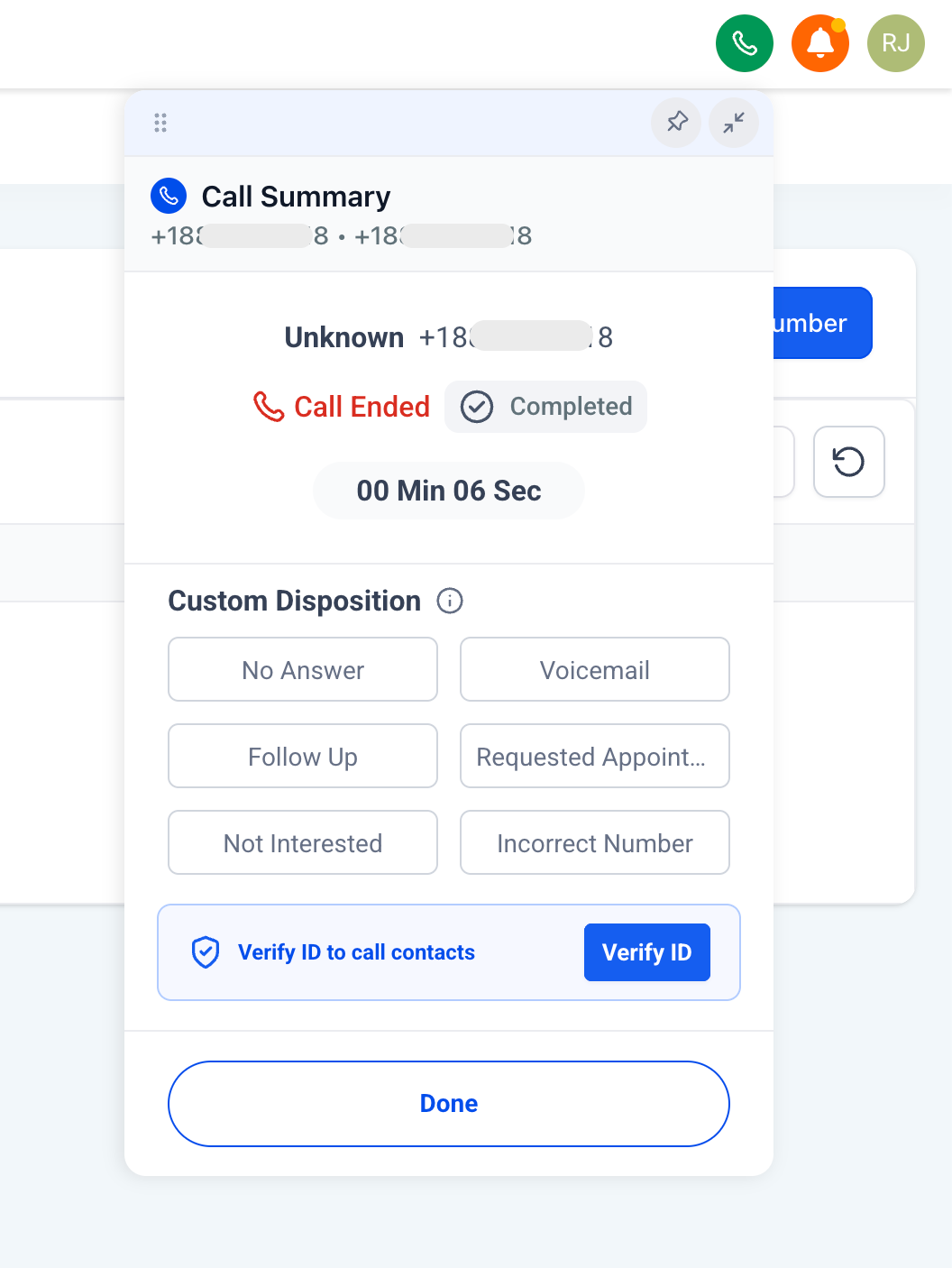
- Place the call.!(https://assets.patientcopilot.ai/05459f38d88b2851.png) * * * ## Billing Considerations for Voice Calls Voice calling may still have usage-based costs even when a Patient Copilot phone number is not purchased first. Understanding billing helps users avoid confusion between phone number purchase costs and call usage charges. The main cost difference is that users do not need to purchase a Patient Copilot number upfront to try voice calling with an existing number. However, outbound voice usage may still be billed based on the applicable LC Phone rates. Review the LC Phone Pricing & Billing Guide for current phone number costs, voice call rates, messaging rates, carrier fees, and rebilling information. * * * ## Frequently Asked Questions **Q: Do I need to buy a Patient Copilot number before making voice calls? **A: No. This release allows users to place voice calls using a phone number they already own, so purchasing a Patient Copilot number first is no longer required. **Q: Can I use any phone number I own? **A: The release note confirms that users can place calls using a phone number they already own. Use the phone number options shown in Patient Copilot to confirm whether your specific number can be added or verified. **Q: Is this the same as verified caller ID? **A: It may use a similar ownership verification concept, but the release note does not explicitly confirm that it is the same flow. Patient Copilot’s existing verified caller ID article explains how users verify their own phone number for voice calls. **Q: Can I receive inbound calls in Patient Copilot using my existing number? **A: The release note only confirms placing voice calls. It does not confirm inbound calling support for existing owned numbers. Users who need inbound call routing may need a Patient Copilot-managed number, forwarding setup, or number porting, depending on their phone setup. **Q: Can I send SMS from my existing number? **A: The release note only mentions voice calling. It does not confirm SMS support using an existing owned number. **Q: Will I still be charged for calls? **A: Purchasing a Patient Copilot number first is no longer required, but voice usage charges may still apply. Review LC Phone billing details for current call pricing. **Q: Is using my existing number the same as porting it into Patient Copilot? **A: No. Using an existing number for voice calls allows you to place calls with that number. Porting moves number management into Patient Copilot. **Q: Can I purchase or port a number later? **A: Yes. Using an existing number to try calling does not prevent users from purchasing a Patient Copilot number or porting a number later if they need a fuller phone setup. * * * ## Related Articles - How to Set Up Verified Caller ID (Use your number for Voice Calls) - Outbound Calls with Dialer in Patient Copilot Web App Softphone
!(https://assets.patientcopilot.ai/38351e91f7e007e3.png)