
24/7 Customer Support Options
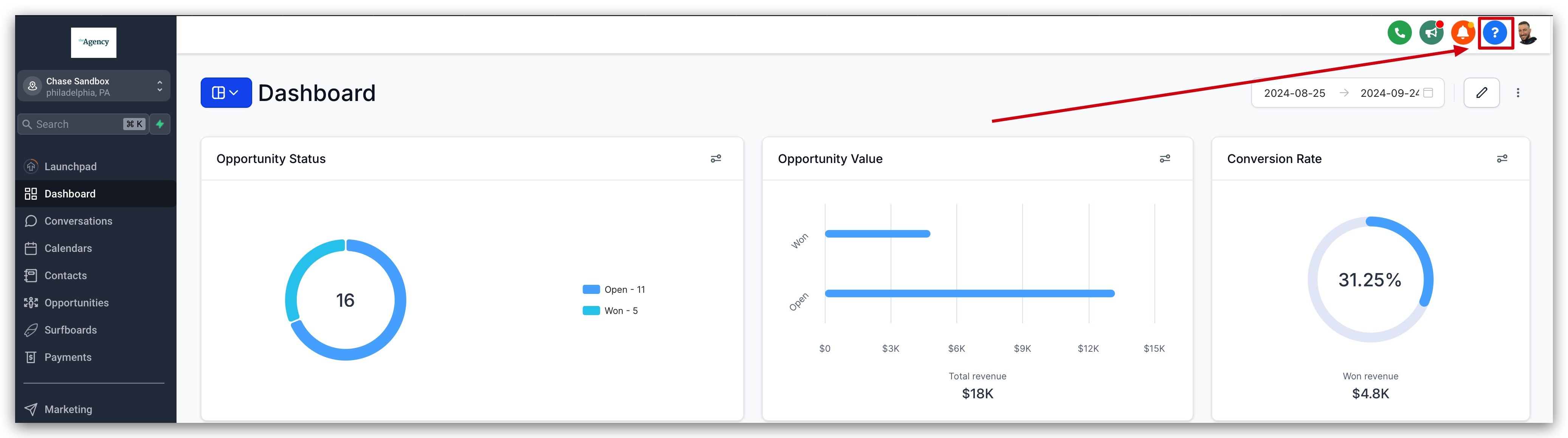
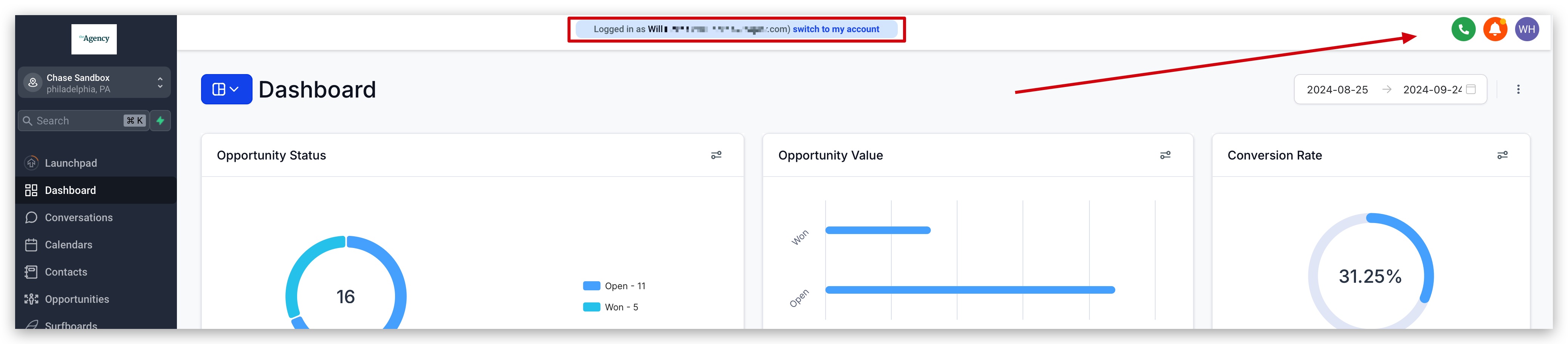
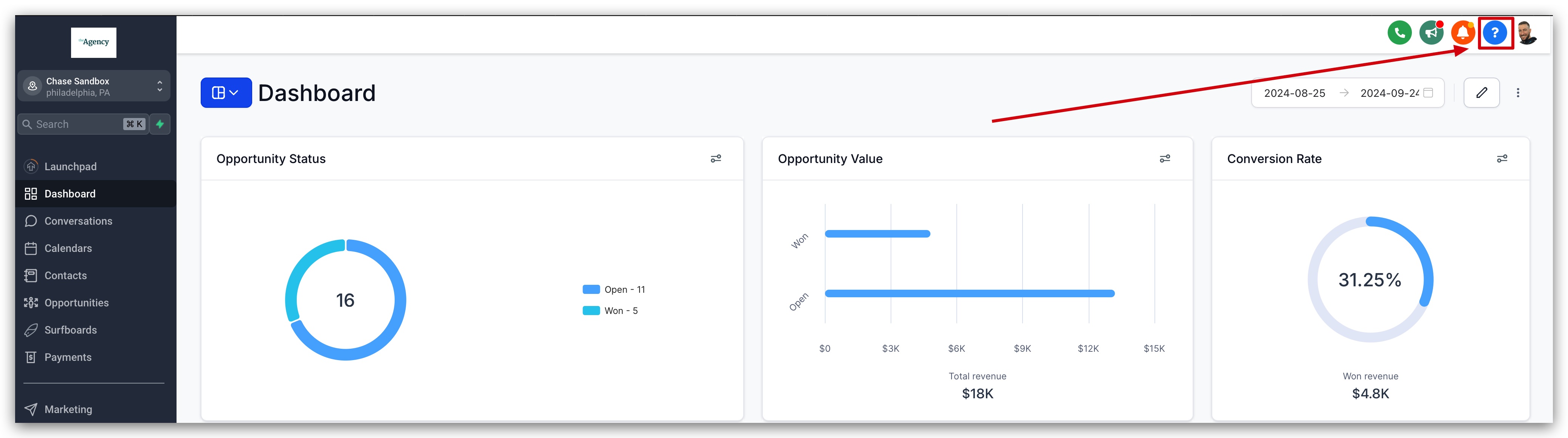
How to Access 24/7 Support At any time of the day or night, seven days a week, you can begin a new LIVE chat with one of our Patient Copilot Support Agents! To access your support options, select the blue question mark in the top right corner of the Patient Copilot Application (Available on Desktop only). From here, you can choose the support option that best fits your schedule or needs. IMPORTANT: Only Agency Admins/Users Can Access Patient Copilot Support Patient Copilot Support agents are unable to make changes to an agency account without the consent of a validated Agency Admin or Agency User. If you do not have access to the Agency view, you must reach out to your Agency Admin.!(https://assets.patientcopilot.ai/24542b695888a18e.gif)!(https://assets.patientcopilot.ai/242d68737bd45654.jpg) * * * ## Who Can Access Patient Copilot Support? Only Agency Admins/Users Can Access Patient Copilot Support. Patient Copilot Support agents are unable to make changes to an agency account without the consent of a validated Agency Admin or Agency User. If you do not have access to the Agency view, you must reach out to your Agency Admin. Only Agency Admins/Users See the Support Button If you are an agency admin or agency user, you will see the blue button in the top right corner of the screen where you can get support from Patient Copilot as shown in the image below.!(https://assets.patientcopilot.ai/b61739706cb1e1ca.jpg) Location Admins/Users Do Not See the Support Button You can see in the image below that location admins and location users will NOT be able to access Patient Copilot support. The blue support button in the top right corner is not even visible as you can see in the image below.!(https://assets.patientcopilot.ai/459d66b5c4f304ee.jpg) * * * ## Customer Support Options Patient Copilot customers have access to multiple different support channels so you can choose the one that best fits your support needs, preference, or busy work schedule. You can learn more about the differen support channels below! 1. Zoom Support Call - Jump directly into a live Zoom room with the Patient Copilot support team where you can get your questions answered and get hands-on help with any issue you’re currently facing!
!(https://assets.patientcopilot.ai/242d68737bd45654.jpg)
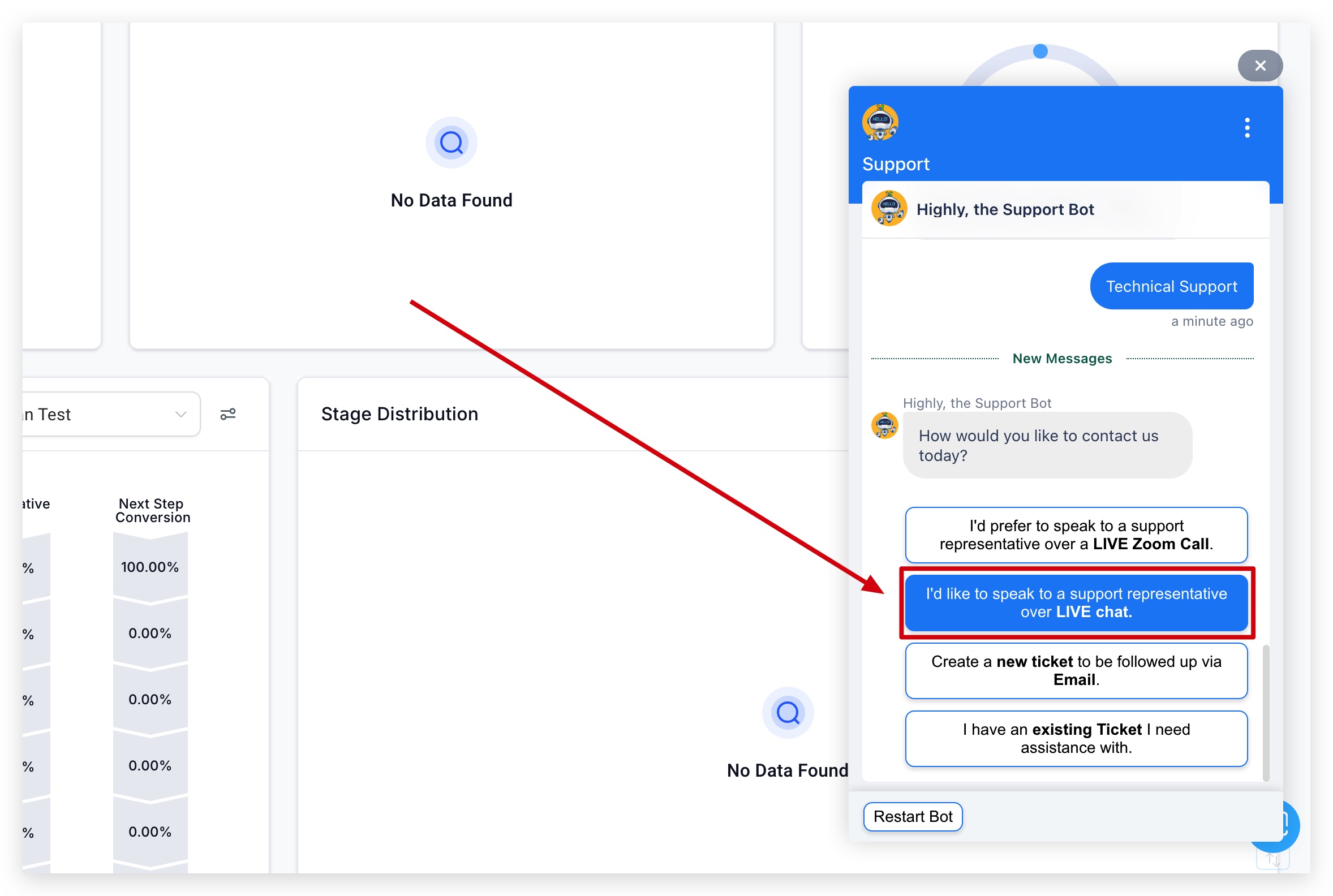
- Live Chat Support - Speak directly to our support team using our live chat inside of your Patient Copilot account!
- Support Ticketing - Open a support ticket for any inquiries or issues you’re facing, and communicate back and forth with our support team via email.
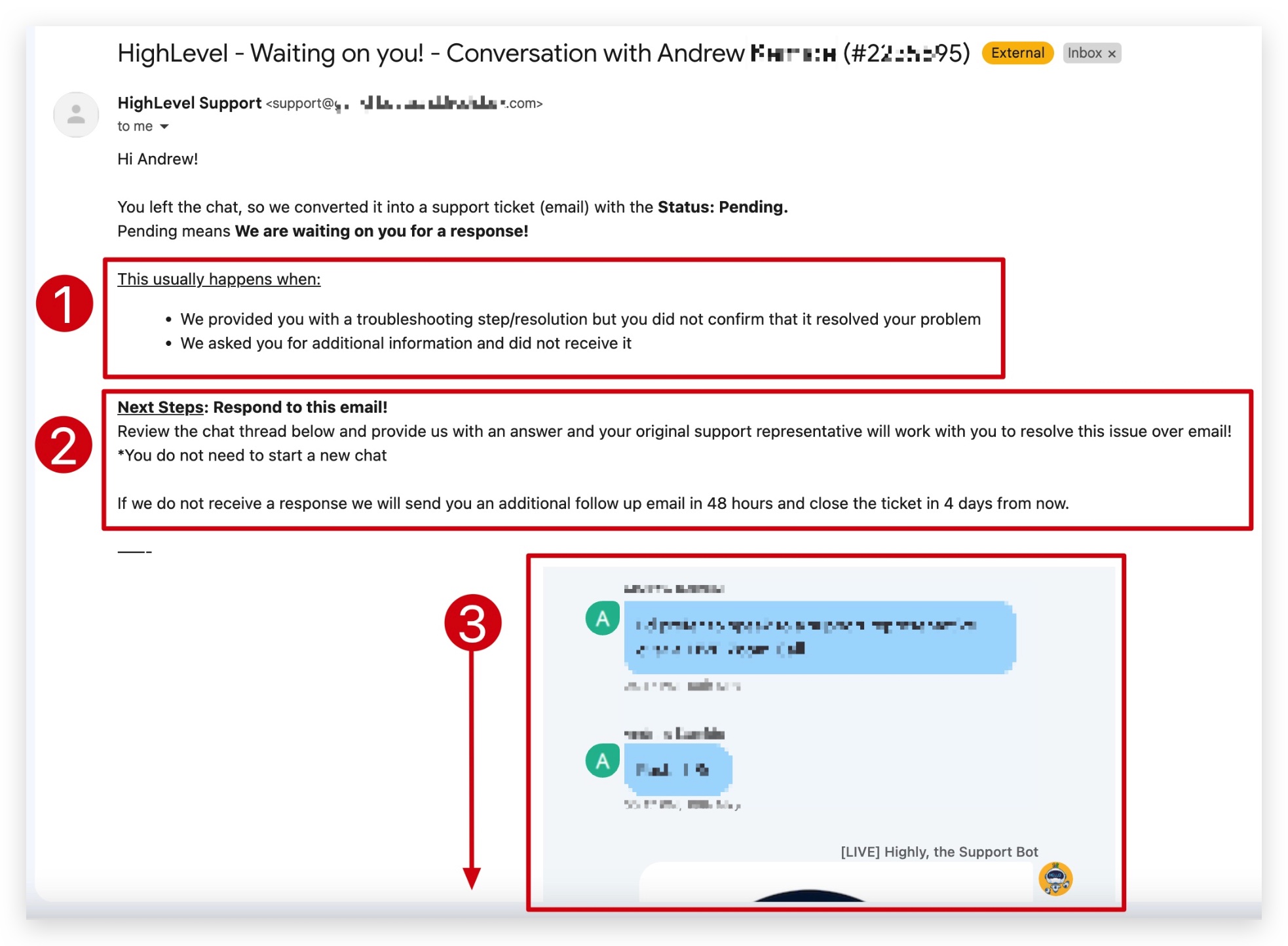
- Phone Support - Call our support team using our dedicated support phone number. IMPORTANT: In order to receive email support from our team, you will need to open a support ticket. Patient Copilot does NOT have a general support email address!(https://assets.patientcopilot.ai/ef5a675399128691.jpg) * * * ## Zoom Support Calls If you need face-to-face support from our team, you can quickly and easily join our Zoom support rooms and chat with a support agent who will answer your questions and guide you through your support inquiries in person! Once you request a Zoom call, you will be added to a queue where you will wait for the next available support agent. This agent will help you troubleshoot the issue you’re experiencing live on Zoom and do their best to resolve the issue right then and there. PLEASE NOTE: If the issue cannot be resolved during the Zoom call, the support agent will open a support ticket for your issue and you will need to resolve the issue using email communication with our team.!(https://assets.patientcopilot.ai/5205f6259839ee98.jpg)!(https://assets.patientcopilot.ai/1174e152308a8e49.jpg) * * * ## Live Chat Support If you need support, and you don’t want to jump in a Zoom call, you can simply start a chat session with our expert agents using the live chat directly inside of you account! Our agents will gather as much information as they can about the issue you’re having, and do their best to help you solve the problem right then and there. If the issue cannot be solved, the agents will escalate the issue to a team that may be better suited to help, and create a support ticket for your issue so that you can maintain communication with our support staff while the issue is being addressed.!(https://assets.patientcopilot.ai/eb8b2098aa822efe.jpg) * * * ## Support Ticketing via Email IMPORTANT: In order to receive email support from our team, you will need to open a support ticket. Patient Copilot does NOT have a general support email address If you are too busy to speak to our team on a Zoom call or live chat, you can always just create a support ticket immediately and communicate back and forth with our support staff via email at your earliest convenience. We would like to ask that you respond as soon as possible to any email coming from our team so that we can get your support issue resolved as fast as we can. You’re experience in Patient Copilot is our #1 priority, so we want to make sure any issue you’re having are resolved fast so you can get back to growing your business! ## What’s Included in a Support Ticket? 1. Why You’re Receiveing The Ticket Email In this initial email, you will see a few possibilities as to why you’re chat was converted into a support ticket. These usually include: - Our support team provided you with a troubleshooting step or resolution but you did not confirm if that step resolved the issue.

!(https://assets.patientcopilot.ai/1174e152308a8e49.jpg)
- Our support team asked you for additional information and did not receive it. 2. Next Steps We outline what steps you can take to further investigate the support issue and hopefully resolve it. 3. Conversation History The email you receive from our support team will have a full history of the original conversation you had with our support agent(s) so that you can go back and reference anything that was initially talked about during that conversation with our team.!(https://assets.patientcopilot.ai/2a43181bf52ceccc.jpg) * * * ## Phone Support At any time of the day, you can call +1 (888) 732-4197 for any sales, billing, or login related issues. We validate all inbound callers, no matter the caller, to confirm they are an Agency Admin. International Phone Support Numbers: - South Africa: +27 87 250 2674
- Netherlands: +31 97010208764
- United Kingdom: +44 808 502 2329
- Philippines: +63 1800 1 550 0097
- Australia: +61 1800 983 916 IMPORTANT: We Validate All Inbound Callers to make sure they are Agency Admins. We WILL NOT serve Non-Agency Admins who call the support phone number. We cannot service non-agency admins that call in. We will need to validate your identity as an Agency Admin - we will encourage you to reach out to another Agency Admin to grant you access or reach out on your behalf. Your security for your agency account matters to us. If your Agency Patient Copilot email is not the best one to reach you at, please mention this to Support. If your email is associated with multiple agencies, provide the correct agency name and relationship number of the account in question. Please have your Agency Relationship Number and your Agency Login Email ready for the phone support team. * * * ## Troubleshooting & FAQ’s Below you will find some frequently asked questions and process to help you troubleshoot issues surrounding customer support. If there is a question that you need answered, and you don’t see it below, please make sure to let our support staff know, or you can send us feedback on this article and ask us to add the question to the article. Q: Does Patient Copilot have a support email address? No, we do not have a support email. The main reason is because our support flow is very detailed so that we can properly identify the issue the user is experiencing, and create a ticket in our support software that includes all the information needed for our support agents to help resolve the issue. If we had a general support email address, then all emails sent to that address would create support tickets, and they may not include the proper information needed to give our support staff the best chance to help resolve the issue. Q: How to Contact Support if I can’t Login to Patient Copilot? If you are having trouble logging into your Patient Copilot application, and you need to get support outside of the application, you have the following options to contact Patient Copilot support: 1. Phone Support: Call this number to reach our support if you’re having trouble loggin in (+1 (888) 732-4197)
- Website Chat Widget: You can also reach out support staff if you navigate to our main website and use our website chat widget. Make sure to tell our team that you are having trouble logging in, and that you need help from support.
- Email Support: Submit a ticket using this form and our team will get on it right away. IMPORTANT: Have your Agency information ready so our team can verify your identity and make sure you are an agency admin or account owner. Q: I’m not seeing the Blue Question Mark button in my dashboard The blue question mark button and its features are only visible to users logged in as a “Agency Admin” or “Agency User”.!(https://assets.patientcopilot.ai/a4e25a737cfe2357.jpg) IMPORTANT: Location Admins and Location Users will NOT see the blue question mark button, this is strictly for Agency Admins and Agency Users. Q: How to Create an Agency “Admin” to get Patient Copilot Support? 1. Go to “Agency Settings” -> Click on the “Team” tab -> Click ”+ Add Employee” button and complete: - User Info: Email, phone number and password is required - User Permissions: Select the user permission you wish your user to have
- Make sure that the User Type section is “Agency” 3. Select the User Role as “Admin” 4. Click on “Add To Account” and select the location(s) you want this user to manage
- Hit “Save” PLEASE NOTE: - In order to add a user, you will need to be an “Agency Admin”. - You will need to notify the user with login info and password. - Once the user logs in they can update their password. * * * ## Additional Self-Service Support Resources It is frustrating when we need help but can’t get it as fast as we’d like it. That’s why we’ve provided these hacks and tips below to help you get the fastest resolution time possible. 1. Check out our knowledge base and YouTube channel - Knowledge Base
- YouTube 2. Hop into one of our weekly and monthly events here: - Patient Copilot Events Page
- HL Daily Demo
- Daily Q&A 3. Search our Facebook Community group for answers to frequently asked questions: - Facebook Group PLEASE NOTE: To get into our Facebook Group you need to provide your email address (the one used upon sign up), your Agency Name and agree to the community rules.