
Deactivating Calendar Groups
- Home
- Knowledge base
- Calendars & Appointments
- Calendar Groups
- … - Knowledge base - Calendars & Appointments - Calendar Groups
- Deactivating Calendar Groups
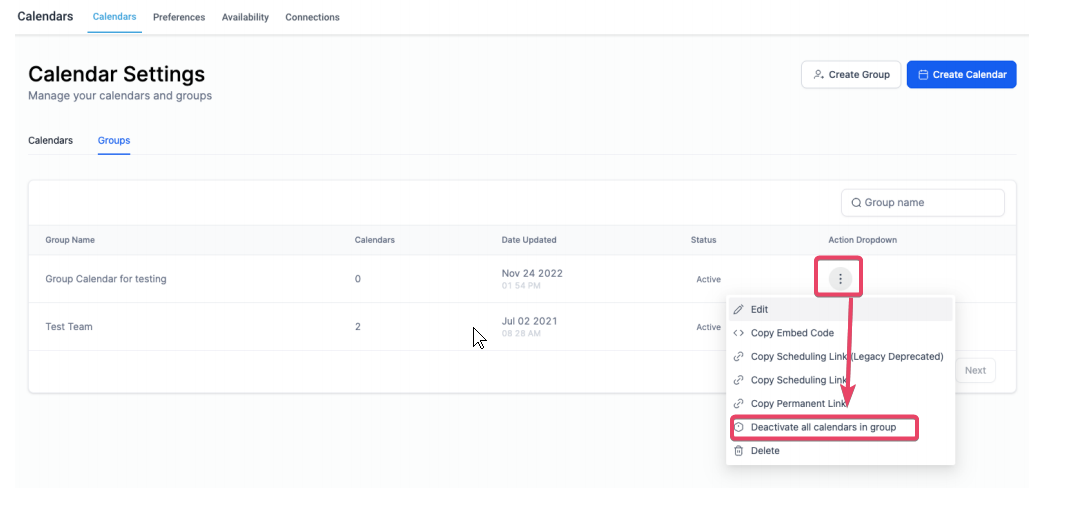
 Sorry! nothing found for You can deactivate a single group by clicking on the “ellipses” against the group which you wish to deactivate. 1. Clicking on the ellipses would open the options drawer 2. You can now see a new option “Deactivate all calendars in group” 3. Clicking on which would show a pop-up requesting confirmation ## **!(https://assets.patientcopilot.ai/f65cfa5f80420820.png)!(https://assets.patientcopilot.ai/a7add6c6bfafa3a9.png) ** Was this article helpful? That’s Great! Thank you for your feedback Sorry! We couldn’t be helpful Thank you for your feedback Feedback sent We appreciate your effort and will try to fix the article
!(https://assets.patientcopilot.ai/a7add6c6bfafa3a9.png)